Choosing the best monitor light bars for office setups can significantly improve your workspace’s comfort and productivity. The top models balance eye-care features, brightness control, and sleek design, with the BenQ ScreenBar Pro standing out for its adjustable brightness and high-quality light. The Quntis Monitor Light Bar offers a budget-friendly, glare-free option, while the BenQ ScreenBar Halo 2 adds wireless control for convenience. These products reflect common tradeoffs, like higher cost versus better features or simplicity versus advanced customization. Continue reading for a detailed breakdown to help you find the best fit for your office needs.
Key Takeaways
- The top picks excel in eye-care technology, reducing glare and eye strain during long work sessions.
- Adjustability—brightness, color temperature, and positioning—was a key factor in differentiating the best options.
- Sleek, space-saving designs remain a priority, though some models sacrifice features for a minimalist look.
- Higher-priced models tend to include more advanced controls and better build quality, but budget options still provide solid performance.
- Compatibility with curved screens and multiple monitor setups is an important consideration for versatile office environments.




More Details on Our Top Picks
Quntis Monitor Light Bar with Remote, Eye-Care No Glare, Space Saving Desk Lamp for Curved Monitors
The Quntis Monitor Light Bar stands out for its combination of ease of use, eye-care technology, and versatile compatibility, making it a strong choice for most office setups. Its stepless dimming and adjustable color temperature via remote ensure personalized lighting that reduces eye strain, outperforming some simpler clip-on options like the Quntis Computer Monitor Lamp, which lacks remote control. While it requires a USB port for power, its minimalist design minimizes desk clutter and fits both curved and flat monitors. The main tradeoff is that its clip may not fit very thick monitors, limiting its universal compatibility. This pick is ideal for users who want customizable, glare-free lighting without complicated setup.
Pros:- Adjustable brightness and color temperature for personalized lighting
- Glare-free, eye-care technology reduces eye strain
- Space-saving, minimalist design with easy clip installation
- Compatible with various monitor types, including curved screens
Cons:- Requires USB port for power, which may be inconvenient
- Remote control batteries not included, requiring extra purchase
Best for: Office workers and gamers seeking adjustable, eye-friendly illumination that easily integrates with various monitor types
Not ideal for: Users with monitors that are particularly thick or with limited USB ports on their devices
- Lighting Technology:LED
- CRI:95
- Lux:900+ lux
- Color Temperature:Adjustable via remote
- Power Source:USB-powered
- Compatibility:Curved and flat monitors
Bottom line: This monitor light bar suits those who want customizable, glare-free illumination with minimal setup and fuss.
Quntis Computer Monitor Lamp, Screen Monitor Light Bar for Eye Care, Dimmable USB Reading LED Task Light with Auto-Dimming, Touch Control, No Glare, Space Saving Home Office Desk Lamp
The Quntis Computer Monitor Lamp emphasizes eye health with flicker-free, blue light hazard-free illumination, making it especially suitable for long hours of screen work. Its auto-dimming feature, combined with manual brightness and color temperature adjustments, offers a high level of control, surpassing similar clip-on models like the Quntis Monitor Light Bar with Remote, which lacks auto-dimming. The fixed mounting clip might not fit all monitor sizes, and it requires a constant USB connection, which could limit placement flexibility. Despite these tradeoffs, its high CRI and effective glare reduction make it an excellent choice for users prioritizing eye comfort during extended use.
Pros:- Reduces eye strain with flicker-free, blue light hazard-free illumination
- Auto-dimming enhances comfort during prolonged use
- High CRI for vibrant, true-to-life colors
- Space-saving clip-on design
Cons:- Requires USB connection, limiting placement options
- Limited waterproofing, not for humid conditions
- Fixed clip may not fit all monitor sizes
Best for: Individuals who spend many hours at their desk needing eye protection and customizable lighting
Not ideal for: People with monitors that are unusually thick or in humid environments where water resistance is needed
- Light Source Type:LED
- Power Source:USB
- Wattage:5 watts
- CRI:High
- Control Method:Touch
- Mounting Type:Clip On
Bottom line: Ideal for intense screen users who need eye protection with adjustable, auto-dimming features.
Quntis Curved Monitor Light Bar 15 RGB Backlight for 34+ Inch Screens
The Quntis Curved Monitor Light Bar is designed specifically for ultrawide and curved screens over 34 inches, providing extensive coverage and ambiance with RGB backlight modes. Its adjustable RGB modes and stepless dimming allow for a highly customized workspace, unlike simpler lighting options such as the BenQ ScreenBar Halo 2, which focuses more on white light. The auto-dimming sensor reduces eye fatigue effectively, but its reliance on 5V USB power and the complex setup might be a barrier for some users. Nonetheless, its large size and RGB features make it perfect for creating immersive, personalized environments for large screens.
Pros:- Compatible with large ultrawide and curved monitors over 34 inches
- RGB backlight with 15 modes for ambiance customization
- Stepless dimming and color temperature control
- Auto-dimming sensor reduces eye fatigue
Cons:- Requires USB power, limiting placement flexibility
- Setup can be complex for some users
- Limited to 5V USB power source
Best for: Users with large ultrawide or curved monitors wanting vibrant backlighting and extensive coverage
Not ideal for: Small monitor setups or users seeking minimalistic, straightforward lighting solutions
- Length:25.74 inches
- Compatibility:Screens over 34 inches, curved or flat
- Color Temperature:3000K to 6500K
- Brightness:500 to 1400 Lux
- RGB Backlight Modes:15
- Power:5 Volts USB
Bottom line: This light bar is perfect for those with large screens who want immersive RGB lighting and auto-dimming features.
LED Desk Lamp for Office and Home – Eye-Caring Architect Lamp with Clamp, Dual Screen Compatibility, 24W, 5 Color Modes, Adjustable Lighting
The LED Desk Lamp for Office and Home offers a flexible, multi-mode lighting solution that adapts well to various tasks such as reading, drafting, or studying. Its 25 modes and adjustable color temperatures outperform many basic clip-on lights like the Quntis Computer Monitor Lamp, especially for users needing a wide range of lighting options. The adjustable arms and remote control make it easy to customize the setup; however, its weight of nearly 3 pounds might be cumbersome for some users, and remote reliability can be inconsistent. Despite these issues, its broad adjustability and multiple modes make it a good all-around choice for versatile lighting needs.
Pros:- Multiple adjustable lighting modes and color temperatures
- Flexible design with 360° stand and 180° swing arms
- Remote control for easy adjustments
- Eye-friendly, flicker-free LED illumination
Cons:- Remote control may malfunction requiring replacement
- Relatively heavy for a desk lamp
- Not waterproof, unsuitable for damp environments
Best for: Users who want a multi-functional, adjustable desk lamp for varied tasks and environments
Not ideal for: Those seeking a lightweight, purely minimalist lighting option or needing waterproof features
- Power:24 watts
- Color Temperatures:3000K-5500K
- Brightness Levels:20%-100%
- Lighting Modes:25
- Remote Control:Yes
- Mounting Type:Tabletop with Clamp
Bottom line: This versatile lamp suits users needing a wide array of adjustable, eye-friendly lighting options for various tasks.
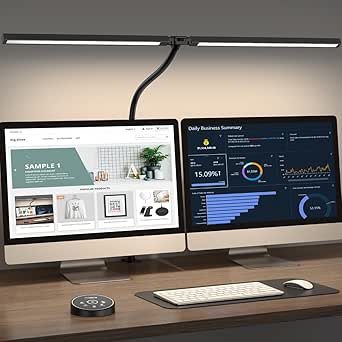
ONEMIX 42-Inch LED Desk Lamp with Clamp, Adjustable Architect Light with Remote, 1800 Lumens, Eye-Caring, for Home Office and Study
This 42-inch LED lamp stands out for its extensive length and flexible segmented design, making it an excellent choice for users who need customizable lighting across multiple work areas or large desks. Unlike the BenQ ScreenBar Pro, which provides a focused, glare-free illumination suitable for single monitors, the ONEMIX lamp offers a broader, adjustable light spread ideal for creative tasks or shared spaces. Its remote control with preset modes adds convenience, though the complexity of the remote and assembly process might be off-putting for some. The flicker-free LEDs and multiple brightness and color temperature settings ensure comfort during long work sessions, but the limited color temperature range may not satisfy those seeking very warm or cool lighting extremes. This pick makes the most sense for home office users who want full control and versatility in their lighting setup, especially when working at larger or multi-monitor configurations.
Pros:- Segmented, adjustable light bar for versatile illumination
- Remote control with preset modes and timer functions
- Flicker-free LEDs reduce eye strain during long use
- Sturdy clamp suitable for desks up to 2.75 inches thick
Cons:- Remote control layout can be confusing for some users
- Assembly required for support arm and clamp
- Limited color temperature range for very warm or cool lighting
Best for: Home office users who need versatile, adjustable lighting for large or multi-area setups
Not ideal for: Minimalist desk users or those seeking simple, plug-and-play solutions with minimal setup
- Length:42 inches
- Brightness:1800 lumens
- Color Temperature:3200K–6500K
- Brightness Levels:5
- Color Temperature Settings:5
- Remote Control:Yes
- Clamp Thickness:up to 2.75 inches
- Power:24W
- Warranty:1 year
Bottom line: This lamp is ideal for users who want flexible, comprehensive lighting control for larger or multi-tasking workspaces.
BenQ ScreenBar Pro LED Monitor Light Bar (Black) – Ultrawide, Motion Sensor, Adjustable Brightness & Color Temperature, Eye-Care USB-C Lamp for Curved Monitors
The BenQ ScreenBar Pro excels at providing bright, glare-free lighting specifically tailored for monitor use, with an ultrawide illumination area that covers large or curved screens. Compared with the ONEMIX lamp, which offers broader, multi-directional light, the ScreenBar Pro focuses on reducing eye strain for single, centered monitors, especially curved or ultrawide displays. Its motion sensor automatically turns the light on or off, adding convenience for busy users, though it’s limited to monitor thicknesses under 2.56 inches, and it relies on USB-C power, which may require extra adapters. The adjustable brightness and color temperature allow fine-tuning for visual comfort, making it perfect for professionals or students working at a single, large screen. However, this focused design might not suit users with multiple monitors or those seeking more flexible lighting arrangements.
Pros:- Bright, wide-area, glare-free illumination
- Automatic motion sensor for energy efficiency
- Adjustable brightness and color temperature for comfort
- Easy to install and adjust with touch controls
Cons:- Limited to monitor thickness up to 2.56 inches
- Requires USB-C power, which might need adapters
- No waterproof or water-resistant features
Best for: Professionals or students with single, large, or curved monitors seeking glare-free, automated lighting
Not ideal for: Users with multi-monitor setups or those needing comprehensive desk lighting beyond the monitor area
- Brightness:Over 1000lx central, 500lx range
- Illumination Area:33″ x 20″
- Monitor Compatibility:0.17″ – 2.56″ thickness, 1000-1800R curvature
- Power Source:USB-C or included adapter
- Light Source:LED
- Wattage:5 watts
Bottom line: This light bar is perfect for users prioritizing glare reduction and precise monitor illumination, especially on large or curved screens.
BenQ ScreenBar Halo 2 LED Monitor Light Bar with Wireless Controller and Eye-Care Technology
The BenQ ScreenBar Halo 2 offers a sophisticated solution for reducing eye fatigue through glare-free, balanced lighting combined with ambient backlighting. Its wireless controls, including a desktop dial and touch interface, deliver effortless adjustment of brightness and color temperature, unlike the wired controls of the other options. The long lifespan of over 50,000 hours and full spectrum, dimmable lighting make it suitable for extended use, especially in environments where ambient mood matters. While it requires connection to monitor power and isn’t fully cordless, its sleek, minimalist design and wide compatibility make it ideal for users who want a seamless, modern lighting experience. This model’s focus on auto-adjustments and ambiance makes it less suitable for users needing highly adjustable or broad lighting across multiple areas, but it excels at providing a comfortable, personalized workspace.
Pros:- Glare-free, balanced illumination reduces eye fatigue
- Wireless controller for easy, remote adjustment
- Adjustable color temperature and dimming features
- Long-lasting LED with over 50,000 hours lifespan
Cons:- Requires connection to monitor power, not fully cordless
- Higher price compared to basic desk lamps
- Limited to specific monitor thickness and curvature ranges
Best for: Users seeking a wireless, ambient backlighting solution with easy control and long-lasting LED technology
Not ideal for: Those who prefer standalone desk lamps or need extensive multi-area illumination
- Product Type:Lamp
- Switch Type:Touch
- Additional Features:Adjustable color temperature, dimmable, full spectrum, memory, motion sensor
- Light Source Type:LED
- Controller Type:Wireless, desktop dial, touch
- Wattage:5 watts
- Dimensions:5.6″D x 19.7″W x 4.3″H
- Weight:800 grams
Bottom line: This light bar suits users who want a sleek, wireless, and ambient lighting setup with easy, remote control features.
How We Picked
I evaluated each monitor light bar based on performance, usability, build quality, and value. Essential features included adjustable brightness and color temperature, eye-care technology, and ease of installation. I also considered design aesthetics, compatibility with various monitor sizes, and user control options. Ranking was determined by balancing these factors with price, ensuring that both premium and budget-friendly options were fairly represented. This approach helps identify products that deliver real benefits in everyday office use without unnecessary extras.Factors to Consider When Choosing Best Monitor Light Bars For Office Setups
When selecting the best monitor light bar for your office setup, consider how each feature aligns with your workspace needs. The right choice depends on factors like lighting quality, ease of adjustment, and overall compatibility. Understanding these elements can help you avoid common pitfalls such as overpaying for unnecessary features or choosing a model that doesn’t fit your monitor size or desk layout.Brightness and Color Temperature Control
Adjustable brightness and color temperature are vital for creating a comfortable, eye-friendly environment. Look for models with multiple brightness levels and color modes to tailor lighting to different times of day or tasks. Fixed lighting can cause eye strain or wash out screen visibility, so versatility here is a key advantage of premium options. However, more controls often mean a higher price, so weigh your need for customization against your budget.
Compatibility and Size
Ensure the light bar fits your monitor size and type—whether it’s curved or flat—and consider whether it can accommodate multiple screens. Some models are designed specifically for larger or ultra-wide monitors, providing even illumination across the entire display. Poor compatibility may lead to awkward positioning or insufficient coverage, diminishing the light’s effectiveness. Always verify dimensions and mounting options before purchasing.
Ease of Installation and Control
Look for models with simple mounting options like clips, magnets, or adhesive pads that won’t damage your monitor or desk. Wireless controls, such as remote or app-based systems, add convenience but can introduce connectivity issues or extra cost. Manual controls are more straightforward but may lack the precision or ease of use found in remote-controlled models. Consider your comfort with technology when choosing between these options.
Design and Aesthetics
A slim, minimalist design can enhance your workspace’s look, especially if you prefer a clutter-free desk. However, some highly aesthetic models may sacrifice functionality or adjustability. Think about whether the light bar complements your monitor and desk setup or if it’s more important to prioritize features like glare reduction and brightness control. Material quality and build durability also matter for long-term use.
Price and Value
While premium models often include advanced features like wireless control and extensive customization, budget options can still offer effective glare reduction and decent adjustability. Avoid overspending on features you won’t use, but also be wary of cheap models lacking essential eye-care technology. Identifying your actual needs versus marketing claims will help you find the best value for your money.
Frequently Asked Questions
Will a monitor light bar improve my eye comfort during long work hours?
Yes, a good monitor light bar reduces glare and provides balanced illumination, which can lessen eye strain and fatigue during extended use. Features like adjustable brightness and color temperature allow customization to match ambient lighting, creating a more comfortable viewing environment. Choosing a model with flicker-free, eye-care technology ensures that your eyes stay protected over time.
Can a monitor light bar work with curved monitors or multiple screens?
Many monitor light bars are designed to fit curved monitors or multi-screen setups, but size and mounting options matter. Look for models that specify compatibility with larger or curved displays, or those with adjustable arms or clamps that can adapt to various configurations. Proper coverage is essential for even lighting, so verify dimensions before purchasing to avoid shadowed or uneven illumination.
Is it worth paying extra for wireless controls or smart features?
Wireless controls and smart features add convenience and allow for quick adjustments without reaching for manual dials. However, they can also introduce connectivity issues or increase the overall cost. If you value seamless control and frequently change lighting conditions, investing in a model with remote or app-based controls is worthwhile. For simpler setups, manual controls might suffice and save money.
Should I prioritize a sleek design or more functional features?
The decision depends on your workspace aesthetic and practical needs. A minimalist, slim design enhances a clean look but might lack advanced features like multiple color modes or high brightness levels. Conversely, more feature-rich models may be bulkier but offer better customization and eye care benefits. Balance your style preferences with your lighting requirements to find the best fit.
How do I choose between budget and premium monitor light bars?
Budget models often provide basic glare reduction and simple controls, making them suitable for casual or temporary use. Premium options, however, include features like adjustable color temperature, wireless controls, and higher build quality, which can improve comfort and longevity. Evaluate your long-term needs and how much you value advanced features versus cost savings to determine which approach is better for your setup.
Conclusion
For most users seeking a reliable, versatile solution, the BenQ ScreenBar Pro offers an excellent balance of features and quality, making it the best overall choice. Those on a tight budget will appreciate the Quntis Monitor Light Bar for its affordability and eye-care benefits. If you want premium convenience, the BenQ ScreenBar Halo 2 with wireless control is ideal. Beginners or casual users should prioritize ease of use and simple install, while power users with multi-monitor setups should focus on compatibility and adjustability. Ultimately, your choice depends on your specific workspace needs and budget constraints.