

Finding the best Thunderbolt docks for Mac desks means balancing performance, compatibility, and future-proofing. The Plugable 16-in-1 Thunderbolt 4 Dock stands out for its versatility, offering dual 4K support and extensive ports. The Anker Prime TB5 Dock excels with 8K support and 140W charging, making it ideal for power users. However, tradeoffs often include size, price, or port selection, which can complicate choosing the right fit. Continue reading for a detailed breakdown of these options and what makes each unique.
Open a free Amazon Business account
Business pricing, bulk buying and tax-exempt orders.
Create a free accountAs an affiliate, we earn on qualifying purchases.
Key Takeaways
- Top docks offer high-speed data transfer with Thunderbolt 4 and 5, supporting dual 4K or even 8K displays.
- Power delivery capacity varies, with premium picks providing up to 140W, suitable for charging high-performance Macs.
- Port selection is critical; most top models include Ethernet, SD card readers, and multiple USB ports for flexibility.
- Build quality and size differ significantly; compact designs are convenient but may sacrifice some ports or features.
- Compatibility and future-proofing are key, with Thunderbolt 4 and 5 ensuring support for upcoming Mac models and peripherals.
| Plugable 16-in-1 Thunderbolt 4 Dock – Dual 4K Monitors, 100W Charging, HDMI, DisplayPort, Ethernet, USB, SD Card Reader |  | Best Overall Thunderbolt Dock for Mac Desks | Number of USB ports: 7 | Ethernet: 2.5Gbps | SD Card Reader: MicroSD/SD | VIEW LATEST PRICE | See Our Full Breakdown |
| OWC 14-Port Thunderbolt Dock with 85W Charging, 2 Thunderbolt 40 Gb/s, USB 3.2, DisplayPort, GbE, Audio, Supports 5K or Dual 4K Displays |  | Best Value for High-Resolution Dual Display Support | Power Delivery: 85W | Display Support: 1x 5K @ 60Hz or 2x 4K @ 60Hz | Thunderbolt Ports: 2 (40 Gb/s) | VIEW LATEST PRICE | See Our Full Breakdown |
| Belkin Thunderbolt 3 Dock Core with Thunderbolt 3 Cable – 7-in-1 USB-C Hub for Mac & Windows |  | Best Compact Thunderbolt Dock for Simplicity and Dual 4K Support | Ports: DisplayPort, HDMI, Gigabit Ethernet, Thunderbolt, USB-A, USB-C, Audio | Power Delivery: 60W | Monitor Support: Dual 4K | VIEW LATEST PRICE | See Our Full Breakdown |
| Anker Prime TB5 Docking Station, 14-in-1 Thunderbolt 5 Dock with 8K Support and 140W Charging |  | Best Premium Thunderbolt 5 Dock with 8K Support and High Power | Ports: 2 Thunderbolt 5 downstream, 1 upstream Thunderbolt 5, 2 USB-C, 3 USB-A, SD & TF card readers, Ethernet, audio jack, HDMI 2.1 / DisplayPort 2.1 | Max Transfer Speed: 120Gbps | Video Output: Up to 8K@60Hz, dual 8K@60Hz | VIEW LATEST PRICE | See Our Full Breakdown |
| Razer Thunderbolt 4 Dock with 10 Ports, Dual 4K/8K Video Output, USB A & C, 2.5 GbE, Passthrough Charging, Chroma |  | Best Overall Thunderbolt Dock for Mac Desks | Ports: 4x Thunderbolt 4, 3x USB-A 3.2 Gen 2, 1x Gigabit Ethernet, 1x SD card slot, 1x 3.5 mm audio jack | Video Output: Dual 4K 120Hz or single 8K 60Hz | Charging: Passthrough charging via Thunderbolt 4 | VIEW LATEST PRICE | See Our Full Breakdown |
| Kensington SD5700T Thunderbolt 4 Docking Station, Dual 4K, 90W Power Delivery | 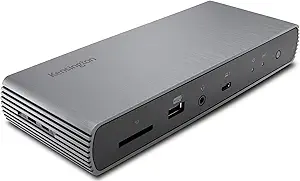 | Best for Versatile Connectivity with Power Delivery | Video Output: Dual 4K @ 60Hz or single 8K | Power Delivery: 90W | Thunderbolt Ports: 3 downstream ports with 15W each | VIEW LATEST PRICE | See Our Full Breakdown |
More Details on Our Top Picks
Plugable 16-in-1 Thunderbolt 4 Dock – Dual 4K Monitors, 100W Charging, HDMI, DisplayPort, Ethernet, USB, SD Card Reader
This Plugable Thunderbolt 4 Dock stands out for its comprehensive port selection and robust dual 4K monitor support, making it ideal for professionals who need a versatile workspace. Compared to the OWC 14-Port Thunderbolt Dock, it offers a slightly more streamlined setup with fewer high-speed data options but excels in delivering dual 4K at 60Hz alongside 100W charging. Its extensive USB and media options make it a favorite for those who prioritize connectivity, though the 3.3-foot cable length may limit placement flexibility. Universal compatibility with Thunderbolt 4, USB4, and macOS 11+ ensures broad use, but it requires a Thunderbolt 4 or USB4-enabled laptop for full functionality.
Pros:- Supports dual 4K monitors at 60Hz for seamless multitasking
- Provides 100W charging to power laptops and peripherals
- Multiple USB ports, Ethernet, and SD card readers for versatility
- Universal compatibility with Mac and Windows systems
Cons:- Requires Thunderbolt 4 or USB4 compatible laptop, limiting older models
- Cable length may be restrictive for some desk arrangements
Best for: Power users who need multiple high-resolution displays and a wide array of peripherals on a Mac desk.
Not ideal for: Users with compact or minimal setups, as the dock’s size and cable length might be restrictive for tight spaces.
- Number of USB ports:7
- Ethernet:2.5Gbps
- SD Card Reader:MicroSD/SD
- Video Output:2x HDMI, 2x DisplayPort
- Power Delivery:100W
- Supported Resolutions:Dual 4K 60Hz
Bottom line: This dock is best suited for professionals who need a comprehensive, high-performance hub for dual 4K workflows on Mac desks.
OWC 14-Port Thunderbolt Dock with 85W Charging, 2 Thunderbolt 40 Gb/s, USB 3.2, DisplayPort, GbE, Audio, Supports 5K or Dual 4K Displays
The OWC 14-Port Thunderbolt Dock offers extensive connectivity with support for high-resolution displays up to 5K or dual 4K, making it an excellent choice for creative professionals. Compared with the Plugable 16-in-1, it provides slightly fewer USB ports but compensates with higher display support and a more robust 85W charging capacity. Its dual Thunderbolt 40 Gb/s ports enable fast data transfer, ideal for demanding workflows, but its setup can be complex for non-technical users. The inclusion of a Thunderbolt cable simplifies initial connection, yet the premium price reflects its high-end performance.
Pros:- Supports 5K or dual 4K displays for crisp visuals
- Provides 85W power for efficient charging
- Two Thunderbolt 4 ports for rapid data transfer
- Multiple USB 3.2 ports and Ethernet for full connectivity
Cons:- Setup may be complex for users unfamiliar with Thunderbolt systems
- Premium price may be a barrier for casual users
- Limited to Thunderbolt-enabled devices for full features
Best for: Content creators and professionals who prioritize high-resolution display support and fast data transfer on Mac or PC.
Not ideal for: Casual users who need simple connectivity options or are on a tight budget, as its extensive features come at a higher cost and complexity.
- Power Delivery:85W
- Display Support:1x 5K @ 60Hz or 2x 4K @ 60Hz
- Thunderbolt Ports:2 (40 Gb/s)
- USB Ports:5 USB 3.2 Gen 1 Type-A, 1 USB 3.2 Gen 2 Type-C
- DisplayPort:Mini DisplayPort 1.2
- Ethernet:Gigabit Ethernet RJ-45
Bottom line: This dock is ideal for professionals needing high-resolution display support and fast data throughput on Mac or PC, despite its premium price and setup complexity.
Belkin Thunderbolt 3 Dock Core with Thunderbolt 3 Cable – 7-in-1 USB-C Hub for Mac & Windows
The Belkin Thunderbolt 3 Dock Core offers a streamlined 7-in-1 setup that still supports dual 4K monitors, making it a practical choice for users who want a simple yet capable dock. Unlike the larger Plugable or OWC options, it emphasizes portability and ease of use, with a single Thunderbolt 3 cable that keeps clutter minimal — ideal for those with limited desk space. Its 60W upstream charging is sufficient for most MacBooks but less than some higher-capacity docks, which could be a drawback for power users. Its compatibility is limited to Thunderbolt 3 devices, so newer Thunderbolt 4 systems may see minimal benefits.
Pros:- Supports dual 4K monitors for high-res visuals
- Upstream charging of 60W for MacBooks
- Compact, portable design suitable for small desks
- Includes a Thunderbolt 3 cable for quick setup
Cons:- Limited to Thunderbolt 3 devices, missing some future-proofing
- Only 60W charging capacity may be insufficient for power users
- Fewer ports than larger docks like Plugable or OWC
Best for: Mac users seeking a sleek, easy-to-setup dual 4K monitor solution with minimal desk clutter.
Not ideal for: Power users needing 85W or more charging or extensive port options, as this dock provides less power and fewer ports than larger models.
- Ports:DisplayPort, HDMI, Gigabit Ethernet, Thunderbolt, USB-A, USB-C, Audio
- Power Delivery:60W
- Monitor Support:Dual 4K
- Cable Included:Thunderbolt 3 cable (20 cm)
- Compatibility:Thunderbolt 3 compatible devices
Bottom line: This dock is perfect for Mac users who want a compact, straightforward solution to connect dual 4K displays without extra fuss.
Anker Prime TB5 Docking Station, 14-in-1 Thunderbolt 5 Dock with 8K Support and 140W Charging
The Anker Prime TB5 Docking Station pushes the limits with 8K support and 140W charging, perfect for demanding creators and professionals. Compared to the Plugable 16-in-1 and OWC, it offers the most advanced video capabilities and the fastest data transfer, thanks to Thunderbolt 5’s 120Gbps bandwidth. Its 14-in-1 array of ports, including SD card readers and multiple USB types, caters to high-end workflows, though its high price and some compatibility limitations on Windows make it less appealing for casual users. The built-in cooling system prevents overheating during intensive tasks, making it a reliable choice for long sessions.
Pros:- Supports up to 8K@60Hz for ultra-high-resolution displays
- Provides a robust 140W charging power
- 120Gbps transfer speeds for large file transfers
- Includes a variety of ports and SD card readers
Cons:- High price point limits accessibility for some users
- Limited support for some Windows configurations
- Cannot support external USB-A hubs due to protocol limitations
Best for: High-end users who need top-tier video, data, and power capabilities on Mac or PC with demanding workflows.
Not ideal for: Budget-conscious or casual users who don’t require 8K output or Thunderbolt 5’s speed, as the premium price may not justify lesser needs.
- Ports:2 Thunderbolt 5 downstream, 1 upstream Thunderbolt 5, 2 USB-C, 3 USB-A, SD & TF card readers, Ethernet, audio jack, HDMI 2.1 / DisplayPort 2.1
- Max Transfer Speed:120Gbps
- Video Output:Up to 8K@60Hz, dual 8K@60Hz
- Charging Power:140W
- Cable Included:Thunderbolt 5 cable (3.3 ft), AC power cable (6 ft)
Bottom line: This dock is best suited for power users and creators who demand the highest resolution, fastest data transfer, and maximum power delivery on Mac desks.
Razer Thunderbolt 4 Dock with 10 Ports, Dual 4K/8K Video Output, USB A & C, 2.5 GbE, Passthrough Charging, Chroma
The Razer Thunderbolt 4 Dock stands out for its extensive port selection and high-resolution video support, making it an excellent choice for those who need maximum connectivity in a single setup. Compared to the Kensington SD5700T, which offers solid dual 4K support and versatile ports, the Razer’s advantage is its support for dual 4K or single 8K displays at 60-120Hz, ideal for creative professionals working with high-res content. While it provides passthrough charging and a variety of ports, its premium price and the need for Thunderbolt 4-compatible devices might limit accessibility for casual users. The tradeoff here is cost versus performance: this dock is best suited for power users who want maximum display output and device compatibility.
Pros:- Supports dual 4K or 8K video output at high refresh rates, perfect for demanding workflows
- Multiple ports including Thunderbolt 4, USB-A, SD card, and audio for comprehensive connectivity
- Passthrough charging keeps laptops powered without extra adapters
- Thunderbolt 4 certification ensures broad compatibility and future-proofing
Cons:- Expensive compared to some competitors, especially for basic users
- Requires Thunderbolt 4 or USB4 devices for full functionality, limiting compatibility with older hardware
Best for: Power users demanding high-resolution multi-display setups and extensive device connectivity, especially creative professionals or engineers.
Not ideal for: Casual users or those with budget constraints, as its premium price and device requirements make it less accessible.
- Ports:4x Thunderbolt 4, 3x USB-A 3.2 Gen 2, 1x Gigabit Ethernet, 1x SD card slot, 1x 3.5 mm audio jack
- Video Output:Dual 4K 120Hz or single 8K 60Hz
- Charging:Passthrough charging via Thunderbolt 4
- Compatibility:Thunderbolt 4, USB4, Mac, PC
- Certifications:Thunderbolt 4 Certified
Bottom line: This dock is best for advanced users who need maximum display options and extensive connectivity, despite its higher cost.
Kensington SD5700T Thunderbolt 4 Docking Station, Dual 4K, 90W Power Delivery
The Kensington SD5700T offers a balanced mix of high-resolution support and practical features, making it suitable for professionals who need reliable dual 4K displays and ample power delivery. Unlike the Razer Thunderbolt 4 Dock, which excels in maximum resolution and port variety, the Kensington’s strength lies in its 90W charging and VESA mounting options, catering well to those who prefer a tidy, flexible workspace. However, its limitation to a single monitor on M1, M2, or M3 MacBooks can be a drawback for users with multiple displays. Additionally, its reliance on Thunderbolt 4 or Thunderbolt 3 limits compatibility with some older Macs and Windows systems, and additional adapters may be needed for certain setups. This makes it a smart choice for users prioritizing reliable power and compact design over maximum display count.
Pros:- Supports dual 4K displays at 60Hz, suitable for high-res productivity
- Provides 90W power delivery to keep laptops and peripherals charged
- Includes SD card reader, Ethernet, and multiple USB-A ports for versatile connections
- VESA mounting compatibility for space-efficient setups
Cons:- Limited to a single external monitor on newer MacBooks with M1, M2, or M3 chips
- Additional adapters needed for some display configurations, adding complexity
Best for: MacBook users who want dependable dual 4K support and VESA mounting, especially in professional or constrained workspaces.
Not ideal for: Users with M1, M2, or M3 MacBooks planning multi-monitor setups, as they face monitor limitations.
- Video Output:Dual 4K @ 60Hz or single 8K
- Power Delivery:90W
- Thunderbolt Ports:3 downstream ports with 15W each
- USB Ports:4 USB-A ports (including 1 charging port)
- SD Card Reader:UHS-II SD 4.0
- Ethernet:Gigabit Ethernet
- VESA Mounting:Yes
- Cable Included:0.8 meter Thunderbolt 4 cable
Bottom line: This dock is ideal for users seeking a reliable, space-saving solution with solid power delivery and decent display support, but with limitations on multi-monitor setups for newer MacBooks.

How We Picked
Our evaluation focused on performance, build quality, compatibility with Mac systems, and feature set. We prioritized docks with Thunderbolt 4 and 5 support, high power delivery, and extensive port options. Ease of use, design quality, and user feedback also influenced the rankings. Products were compared based on their ability to handle demanding workflows, support multiple high-resolution displays, and offer reliable connectivity. This approach ensures that each pick addresses specific needs, whether for professional workflows, casual use, or future-proofing.
Factors to Consider When Choosing Best Thunderbolt Docks For Mac Desks
Choosing the best Thunderbolt dock for a Mac desk involves understanding key factors that affect usability and value. Not all docks are created equal, and some tradeoffs are worth considering depending on your specific needs and budget. Consider these criteria carefully before making your purchase to ensure a seamless experience with your Mac setup.
Performance and Compatibility
Ensure the dock supports Thunderbolt 4 or 5 for maximum data transfer speeds and broad compatibility with the latest Mac models. Thunderbolt 4 offers good future-proofing and is widely supported, while Thunderbolt 5, emerging in newer devices, provides even faster speeds and more features. Compatibility with macOS is essential, so check for driver support and whether the dock works seamlessly with your specific Mac model.
Power Delivery
Power delivery (PD) capacity determines how effectively your MacBook charges. Docks offering 85W or higher are preferable for most MacBooks, especially for those with larger screens or demanding peripherals. Higher wattage reduces the need for a separate charger, simplifying your workspace. Be cautious of docks with lower PD ratings, which may slow charging or require additional power sources.
Port Selection and Versatility
Assess your peripheral needs carefully. Look for docks with a mix of USB-A, USB-C, Ethernet, SD card readers, and audio jacks. The more versatile the port options, the better your setup can accommodate multiple devices. Keep in mind that some docks may prioritize certain ports over others, so choose based on your most used peripherals.
Size, Build, and Design
Size and build quality influence your workspace aesthetics and portability. Compact docks are easier to place on crowded desks but may have fewer ports. Larger, heavier models often include more features and robust construction but can be less portable. Aesthetics can also matter: a well-designed dock can complement a sleek Mac desk setup.
Future-Proofing and Price
Investing in a dock with Thunderbolt 4 or 5 support can extend its usefulness as your peripherals evolve. Consider your budget and whether spending more now will save you from needing an upgrade soon. Balance cost with features; premium models offer superior build and more ports, while budget options might suffice for lighter use but limit expansion.
Frequently Asked Questions
Will a Thunderbolt 3 dock work with my new MacBook?
Most Thunderbolt 3 docks are compatible with newer Macs that support Thunderbolt 4, but they may not support some advanced features like higher power delivery or dual 4K/8K display output. It’s important to verify compatibility with your specific Mac model and check for firmware updates or driver support to ensure seamless operation.
Is it worth paying extra for Thunderbolt 5 support?
Thunderbolt 5 offers faster data transfer speeds and enhanced features, making it a smart choice if you need the latest performance and plan to keep your setup for several years. However, since Thunderbolt 5 devices are still emerging, consider whether your current peripherals can leverage the extra speed or if Thunderbolt 4 is sufficient for now.
How important is charging power when choosing a dock?
Charging power significantly impacts your workspace convenience, especially if you want to minimize clutter. A dock with at least 85W to 100W charging ensures your MacBook stays powered during intensive use. For larger MacBooks or those with high power demands, opt for docks with 130W or more to avoid the need for an external charger.
Should I prioritize port variety or size for my Mac desk dock?
Both matter, but your choice depends on your setup. If you use many peripherals, prioritize a dock with a broad port selection, even if it’s larger. If space is limited, look for a compact design that still offers essential ports like Ethernet, SD card, and multiple USB options, balancing convenience with workspace aesthetics.
Are higher price docks worth the investment?
Higher-priced docks often provide better build quality, more ports, higher power delivery, and future-proof features. If your workflow relies on multiple high-resolution displays, fast data transfer, or charging several devices simultaneously, investing in a premium dock can improve reliability and reduce the need for upgrades later.
Conclusion
For most users, the Plugable 16-in-1 Thunderbolt 4 Dock stands out as the best overall choice, offering a balance of ports, performance, and compatibility. The Anker Prime TB5 Dock is ideal for power users who need 8K support and maximum charging capacity. If budget is a concern, look at more affordable options like the Kensington SD5700T. For beginners or those with simple needs, a more compact and straightforward dock may suffice, while professionals requiring the most robust setups should consider premium models like the Anker Prime. Ultimately, your choice should align with your specific workflow, peripheral needs, and future plans.
College move-in / dorm season Picks
dorm essentials
As an affiliate, we earn on qualifying purchases.