Choosing an all-in-one PC offers simplicity and a clean, space-saving design, making setup quick and hassle-free. However, you trade off some flexibility, as upgrade options are limited compared to a custom setup. Custom builds let you select high-performance parts and upgrade over time, giving you more control and longevity. If you’re willing to invest time and effort, you’ll find that a custom setup better suits evolving needs. Keep exploring to discover which option best fits your priorities.
Key Takeaways
- Custom setups offer upgradeability and future-proofing, while all-in-one PCs prioritize quick setup and minimal maintenance.
- All-in-one systems are more convenient and space-saving but limit hardware customization and long-term flexibility.
- Custom builds deliver superior gaming performance with high-end components versus integrated parts in all-in-one PCs.
- Upgrading or replacing parts in custom setups extends system lifespan, unlike proprietary all-in-one components.
- The choice depends on balancing the desire for performance and flexibility against ease of use and simplicity.

When choosing between an all-in-one PC and a custom setup, it’s essential to contemplate your specific needs and priorities. If gaming performance is high on your list, a custom build often provides the edge, thanks to its superior hardware options. Custom setups allow you to select powerful graphics cards, high-refresh-rate monitors, and ample RAM, all tailored to deliver smooth, lag-free gaming experiences. All-in-one PCs, while convenient and space-saving, typically feature integrated components that aren’t as easily upgraded or optimized for gaming. As a result, they may struggle to keep up with the demands of modern games, especially as titles become more resource-intensive.
Custom builds excel in gaming with upgradeable, high-performance hardware; all-in-one PCs prioritize convenience but lack flexibility.
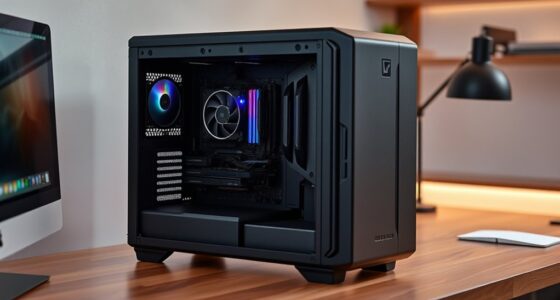
Upgradeability is another pivotal factor. With a custom setup, you have the flexibility to replace or add components over time. You can upgrade your GPU, swap out storage drives, or increase your RAM to extend your system’s lifespan and maintain performance. This adaptability means you won’t have to buy a new machine every few years; instead, you can keep your existing setup current with minimal hassle. Conversely, all-in-one PCs are designed with simplicity and compactness in mind, which often limits their upgrade options. Many come with proprietary components or integrated parts that are difficult or impossible to replace, locking you into the initial configuration. If you’re someone who enjoys tinkering or anticipates needing future upgrades, a custom build offers a distinct advantage.
However, all-in-one PCs shine in terms of ease of use and minimal setup time. They typically come ready to use out of the box, with a sleek design that fits neatly into most environments. If you prioritize a clutter-free workspace and straightforward setup, an all-in-one might be more appealing. But if your focus is on gaming performance and long-term flexibility, a custom setup allows you to fine-tune your hardware to match your evolving needs. You can invest in a robust GPU now and upgrade it later, ensuring your system stays relevant for years.
Additionally, understanding the importance of contrast ratio can help you select a display that complements your hardware for an optimal viewing experience. Ultimately, the choice hinges on what you value most. If you want a hassle-free, space-efficient machine for everyday tasks, an all-in-one PC offers simplicity. But if you’re passionate about gaming, crave the ability to upgrade, and want maximum performance, building a custom PC provides the control and power you need to stay ahead.
Frequently Asked Questions
Which Setup Offers Better Upgrade Options Long-Term?
A custom setup offers better upgrade options and future-proofing potential. You can select components that suit your needs now and easily swap parts later, ensuring your system stays current. With an all-in-one PC, you’re limited by the manufacturer’s design, which restricts upgrade flexibility. If you want long-term viability and the ability to adapt your system over time, building or customizing a PC is the smarter choice.
How Do Maintenance Costs Compare Between the Two?
When it comes to maintenance costs, you’ll find that a custom setup often costs less long-term because you can manage repairs more easily and replace parts as needed. All-in-One PCs tend to have higher repair frequency and can be more costly to fix since they’re less modular. To keep costs in check, it’s best to weigh the convenience of an all-in-one against the flexibility of a custom build.
Which Setup Provides Superior Gaming Performance?
You’ll find that a custom setup offers superior gaming performance because it allows you to choose high-end components tailored for gaming, providing better graphics and faster processing. While pre-built convenience saves time and effort, it often compromises on the latest hardware. With a custom setup, you gain flexibility to upgrade parts over time, ensuring your gaming experience stays first-rate. If gaming is your priority, a custom setup is the smarter choice.
Are There Significant Differences in Warranty Coverage?
Imagine opening your PC’s warranty policy like unwrapping a gift—clear and straightforward. Generally, all-in-one PCs come with standard service coverage, but custom setups often offer more flexible warranty options tailored to individual components. The key difference lies in warranty policies: all-in-ones may have limited coverage for specific parts, while custom builds can provide exhaustive, customizable service coverage. You get peace of mind knowing your investment is protected, no matter the setup.
How Does Each Setup Impact Workspace Ergonomics?
Your workspace ergonomics are influenced by your setup. An all-in-one PC offers a streamlined design, reducing clutter and promoting ergonomic comfort with fewer cables and a built-in display. Conversely, a custom setup allows you to tailor your workspace organization, positioning monitors, and peripherals for ideal ergonomic comfort. Consider your space and preferences to choose a setup that minimizes strain and enhances productivity.
Conclusion
Choosing between an all-in-one PC and a custom setup is like picking between a sleek sports car and a customizable truck. If you want simplicity and a clean look, the all-in-one is perfect. But if you crave flexibility and power, a custom build lets you tailor everything to your needs. Think about what matters most—ease or control—and make your decision. Either way, you’re steering toward a setup that matches your style and workflow.