A split keyboard can really reduce strain by allowing you to position your hands naturally, which minimizes wrist, shoulder, and neck discomfort compared to traditional setups. Its adjustable design supports maintaining a neutral wrist position, reducing repetitive stress and improving overall comfort during long typing sessions. If you want to learn how a split keyboard can help improve your posture and lessen fatigue, continue exploring the benefits and options available.

Get your wardrobe favorites delivered free with Prime
- Fast, free delivery on millions of items
- Prime Video, Amazon Music and more included
- Member-only deals all year
Key Takeaways
- Split keyboards allow customizable positioning, promoting natural hand and wrist alignment to reduce strain.
- They minimize ulnar deviation by preventing outward wrist bending, supporting joint health.
- Adjustable angles and tenting help users find ergonomic comfort, decreasing muscle effort and fatigue.
- Proper setup with split keyboards enhances typing accuracy and reduces repetitive strain injuries.
- Overall, split boards promote better posture and long-term comfort compared to traditional keyboards.
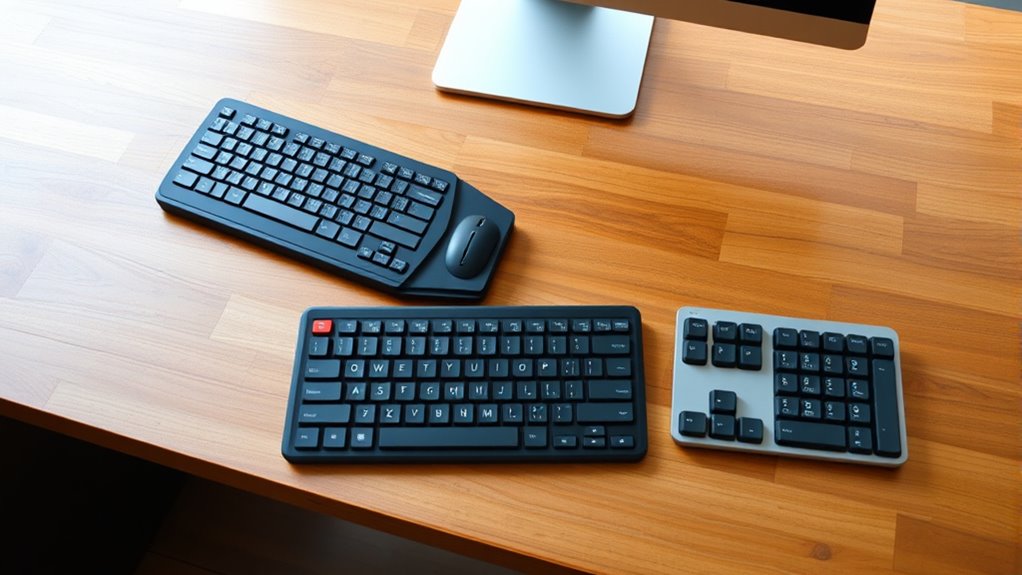
When choosing a keyboard, understanding the differences between a split keyboard and a traditional one can considerably impact your comfort and productivity. One of the key advantages of a split keyboard is its ergonomic benefits. Unlike traditional keyboards, which force your hands and wrists into a fixed, often awkward position, a split design allows you to position each half at a comfortable angle and distance. This reduces strain on your wrists, shoulders, and neck by encouraging a more natural posture. If you spend hours typing, this adjustment can prevent repetitive strain injuries like carpal tunnel syndrome and improve overall comfort during long sessions.
A split keyboard reduces strain and enhances comfort during long typing sessions.
In addition to ergonomic benefits, a split keyboard can enhance your typing accuracy. With the ability to customize the positioning of each half, you can align your hands directly over the keys, reducing unnecessary movements and minimizing errors. This setup promotes better wrist alignment and can help you maintain proper hand position, leading to steadier, more precise keystrokes. Many users find that the improved comfort and proper alignment translate into fewer typos and better focus, especially during extended typing periods.
Switching to a split keyboard might feel unfamiliar at first, but many find that the initial adjustment is well worth the benefits. Because the layout encourages a more natural hand position, you tend to experience less fatigue and discomfort, which can directly impact your typing accuracy. When your hands are in a relaxed, neutral position, your muscles don’t have to work as hard, allowing you to type more efficiently and with greater precision. Over time, users often notice a decrease in errors and an increase in overall productivity, as less time is spent correcting mistakes and more on actual work.
Another notable ergonomic benefit of split keyboards is the ability to reduce ulnar deviation, which occurs when your wrists bend outward while typing on a traditional keyboard. By customizing the angle and positioning of each half, you can keep your wrists in a more natural, straight position. This alignment not only prevents discomfort but also supports long-term joint health. Furthermore, many split keyboards come with adjustable tenting and tilt options, enabling you to fine-tune the setup to match your unique ergonomic needs. Additionally, adjustable features can help accommodate various hand sizes and postures for even better ergonomic support.
Frequently Asked Questions
Are Split Keyboards Suitable for Gaming?
Yes, split keyboards can be suitable for gaming, especially if you prioritize ergonomic benefits. They allow you to position each half comfortably, reducing strain during long gaming sessions. While some gamers might find traditional keyboards more familiar, a split keyboard can improve your overall gaming performance by promoting better posture and reducing fatigue. Give it a try, and you might find your gameplay becomes more comfortable and sustained over time.
What Is the Cost Difference Between Split and Traditional Keyboards?
A split keyboard is like buying a custom suit—it often costs more than a traditional keyboard. Typically, you’ll see a price comparison showing split models range from $100 to $300, while traditional keyboards can be found for as low as $20 to $50. Affordability factors include build quality and features. If you’re on a budget, a traditional keyboard might be more appealing, but a split model offers ergonomic benefits worth the extra investment.
Can Split Keyboards Be Customized for Ergonomic Preferences?
Yes, split keyboards can be customized for ergonomic preferences. You can adjust ergonomic settings like tenting, tilt, and split distance to fit your comfort. Additionally, aesthetic customization options, such as keycap styles and colors, let you personalize your setup. These adjustments help reduce strain and improve comfort during long typing sessions, making a split keyboard a versatile choice tailored to your ergonomic needs and aesthetic tastes.
Do Split Keyboards Require More Desk Space?
A split keyboard doesn’t require more desk space; in fact, it’s like having a superhero’s flexibility for your workspace! Thanks to its ergonomic design, you can position each half to suit your comfort, often making better use of your desk. While it might seem larger initially, the customizable setup actually helps you save space and reduces strain, turning your workspace into a more comfortable, efficient zone.
Are Split Keyboards Compatible With All Computer Systems?
Split keyboards are compatible with most computer systems, but you should check specific keyboard compatibility and system support before purchasing. They typically connect via USB or Bluetooth, making them easy to integrate with Windows, macOS, or Linux. Confirm your device has the necessary ports or Bluetooth capabilities. If you verify system support and compatibility, you’ll enjoy the ergonomic benefits of a split keyboard without worrying about connectivity issues.
Conclusion
Ultimately, choosing between a split keyboard and a traditional one is like picking between a gentle breeze and a rushing river—both can flow smoothly, but each offers a different experience. If you want to ease strain and find comfort in your daily typing, a split keyboard might be your perfect sanctuary. Remember, your hands are the keys to your productivity, so find the one that feels like a natural extension of your body, and let your work flow effortlessly.
Halloween Picks
halloween
As an affiliate, we earn on qualifying purchases.