Finding the best mechanical keyboard for programming involves balancing comfort, performance, and customization. The RK Royal Kludge S98 stands out as the best overall for its wireless flexibility and hot-swappable switches, making it versatile for various setups. The Keychron K3 Version 2 offers an excellent compact design with wireless connectivity, perfect for those with limited space. Meanwhile, the Cherry KC 200 provides durability and a traditional office feel with its aluminum surface. Many programmers face tough choices between switch types, form factors, and wired versus wireless setups. Continue reading for a detailed breakdown of these options and what makes each a strong contender.
Key Takeaways
- Wireless options like Keychron K3 and K10 offer portability but may introduce latency compared to wired keyboards.
- Hot-swappable switches are a common feature among top picks, allowing customization without soldering.
- Compact layouts such as 75% or 96% keyboards balance space-saving design with full functionality, ideal for limited desk space.
- Build quality varies significantly, with premium options like Cherry KC 200 offering long-term durability and premium materials.
- Switch preferences (linear, tactile, silent) heavily influence typing comfort and noise levels, making switch choice a key factor.
| RK Royal Kludge S98 Mechanical Keyboard with Smart Display & Knob, 96% Wireless, Hot Swappable, RGB Backlit, Top Mount | 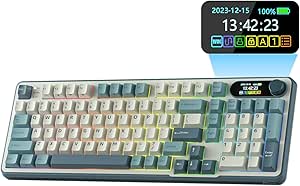 | Best Overall for Programmers Who Value Versatility and Customization | Product Type: KEYBOARDS | Compatible Devices: Laptop, PC, Smartphone, Tablet | Connectivity Technology: Bluetooth, RF, USB-C | VIEW LATEST PRICE | See Our Full Breakdown |
| Logitech G413 SE Full-Size Mechanical Gaming Keyboard |  | Best for Reliable, Durable Performance in a Classic Full-Size Layout | Product Type: Keyboard | Connectivity: USB 2.0 | Compatible Devices: PC | VIEW LATEST PRICE | See Our Full Breakdown |
| Redragon Mechanical Gaming Keyboard Wired with 11 Backlit Modes, Hot-Swappable Red Switch, Anti-Ghosting, Double-Shot PBT Keycaps |  | Best for Customization and Multitasking in a Wired Keyboard | Backlit Modes: 11 | Switch Type: Red, hot-swappable | Keycaps: Double-Shot PBT | VIEW LATEST PRICE | See Our Full Breakdown |
| Keychron K3 Version 2 75% Wireless Mechanical Keyboard with White Backlit, Brown Switch, Mac & Windows Compatible |  | Best for Portability and Multi-Device Productivity | Layout: 75% | Connectivity: Wireless Bluetooth 5.1, USB Wired | Switch Type: Mechanical Brown | VIEW LATEST PRICE | See Our Full Breakdown |
| Keychron K10 HE Hall Effect Wireless Mechanical Keyboard with Magnetic Switches, Hot Swappable, RGB, Aluminum & Wood Frame, Full-Size for Mac, Windows, Linux | 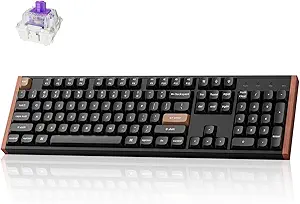 | Best Overall for Durability and Customization | Switch Type: Hall Effect magnetic switches | Connectivity: Bluetooth 5.2, 2.4 GHz wireless, Type-C wired | Layout: Full-size | VIEW LATEST PRICE | See Our Full Breakdown |
| SOLAKAKA KI99 Pro Wireless Mechanical Keyboard with Silent Switches and RGB Backlit |  | Best for Versatile, Quiet Typing in Compact Layouts | Connection Modes: Bluetooth 5.0, 2.4G, Type-C | Battery Capacity: 10,000mAh | Layout: 96% | VIEW LATEST PRICE | See Our Full Breakdown |
| Cherry KC 200 MX Wired Mechanical Office Keyboard with Aluminum Surface |  | Best for Quiet, Professional Office Environments | Switch Type: Cherry MX2A Silent Red | Connection: USB-A | Material: Aluminum surface | VIEW LATEST PRICE | See Our Full Breakdown |
More Details on Our Top Picks
RK Royal Kludge S98 Mechanical Keyboard with Smart Display & Knob, 96% Wireless, Hot Swappable, RGB Backlit, Top Mount
This compact 96% wireless keyboard stands out for combining full functionality with a sleek, space-saving design, making it ideal for programmers who need a versatile setup. Unlike the Logitech G413 SE, which emphasizes durability and a traditional layout, the S98 offers wireless connectivity via Bluetooth, RF, and USB-C, reducing cable clutter. Its hot-swappable switches and customizable smart display enable personalized workflows, though the learning curve might challenge newcomers. The sound-absorbing features enhance typing comfort but might slightly soften the feedback for those who prefer a more clicky feel. Overall, this option is well-suited for programmers seeking a highly adaptable keyboard with advanced features, albeit with some setup complexity.
Pros:- Full 96% layout with dedicated function and navigation keys
- Multiple connectivity options including Bluetooth and RF
- Hot-swappable switches for easy customization
Cons:- Learning curve for users unfamiliar with advanced features
- Sound absorption may slightly alter typing feedback
- Limited to Bluetooth, RF, and USB-C connections
Best for: Programmers who want a compact, wireless keyboard with extensive customization options and smart features.
Not ideal for: Users seeking a straightforward, plug-and-play experience or those who prefer a fully wired setup for absolute reliability.
- Product Type:KEYBOARDS
- Compatible Devices:Laptop, PC, Smartphone, Tablet
- Connectivity Technology:Bluetooth, RF, USB-C
- Number of Keys:96
- Keyboard Backlighting Color Support:RGB
- Switch Type:Linear
- Power Source:Battery Powered
Bottom line: This keyboard is perfect for programmers who prioritize flexibility and feature-rich design in a compact form, accepting some setup complexity.
Logitech G413 SE Full-Size Mechanical Gaming Keyboard
Compared with the more feature-packed RK Royal Kludge S98, the Logitech G413 SE excels in durability and simplicity, making it an excellent choice for programmers who prefer a traditional, no-fuss setup. Its PBT keycaps resist wear, and the brushed aluminum top case lends a premium feel, though it lacks wireless capability, which might be a downside for those who value cable-free desks. The Tactile mechanical switches provide satisfying feedback suited for long coding sessions, while the absence of macro keys limits customization for advanced workflows. This keyboard makes the most sense for users prioritizing build quality and reliability over advanced features or wireless connectivity.
Pros:- Durable PBT keycaps resist wear and heat
- Premium brushed aluminum top case
- Reliable anti-ghosting performance
Cons:- Limited to USB wired connection
- No wireless connectivity options
- Lacks dedicated macro keys
Best for: Programmers who want a sturdy, reliable full-size keyboard with excellent build quality and minimal extras.
Not ideal for: Users looking for wireless or compact keyboards, or those seeking macro customization for specialized workflows.
- Product Type:Keyboard
- Connectivity:USB 2.0
- Compatible Devices:PC
- Backlit:Yes
- Switch Type:Tactile Mechanical
- Keycaps Material:PBT
Bottom line: This keyboard is ideal for programmers who prioritize durability and a classic design over wireless features or extensive customization.
Redragon Mechanical Gaming Keyboard Wired with 11 Backlit Modes, Hot-Swappable Red Switch, Anti-Ghosting, Double-Shot PBT Keycaps
Compared to the wireless flexibility of the RK Royal Kludge S98, the Redragon wired keyboard emphasizes extensive lighting options and switch customization, making it suitable for programmers who enjoy visual feedback and switch tinkering. Its 11 backlit modes are more than enough for personalized aesthetics, though the backlight color cannot be changed dynamically once set, which might frustrate some users. The hot-swappable red switches provide smooth keystrokes for long coding sessions, and anti-ghosting ensures reliable typing under heavy multitasking. The inclusion of macro support and multimedia keys enhances productivity but requires setup and software management. This model makes sense for those who prefer wired stability with comprehensive lighting and switch options.
Pros:- 11 customizable backlit modes for personalized lighting
- Hot-swappable red switches for easy customization
- Anti-ghosting technology supports multiple simultaneous key presses
Cons:- Backlight color cannot be changed on the fly
- Requires software for lighting effects setup
- Limited to wired connection
Best for: Programmers who want extensive lighting effects, switch customization, and reliable wired connection for long coding sessions.
Not ideal for: Users who prefer wireless setups or need a more minimalist, distraction-free workspace.
- Backlit Modes:11
- Switch Type:Red, hot-swappable
- Keycaps:Double-Shot PBT
- Anti-Ghosting:Yes
- Connectivity:Wired
- Warranty:24 months
Bottom line: This keyboard is best suited for programmers who value lighting customization, switch flexibility, and wired reliability for intensive use.
Keychron K3 Version 2 75% Wireless Mechanical Keyboard with White Backlit, Brown Switch, Mac & Windows Compatible
Compared to larger wired options like the Redragon or Logitech, the Keychron K3 V2 shines in portability, making it a prime choice for programmers who work across multiple locations or devices. Its 75% layout condenses essential keys into a compact form, though it sacrifices some function keys, which might be inconvenient for heavy multitasking. The low-profile Brown switches deliver a satisfying typing experience with less fatigue, and Bluetooth 5.1 support allows seamless switching between Mac and Windows systems. However, the plastic bottom frame may feel less premium and slightly reduce durability over time. This pick is perfect for those prioritizing a lightweight, wireless solution that still offers a good typing feel and multi-device support.
Pros:- Compact 75% layout saves space and increases portability
- Supports multi-device pairing with easy switching
- Responsive low-profile Brown switches
Cons:- Lacks some dedicated function keys due to size
- Requires firmware updates for optimal compatibility
- Plastic bottom frame may reduce durability
Best for: Programmers who need a portable, multi-device wireless keyboard with a balanced typing experience.
Not ideal for: Users requiring a full set of function keys or seeking a more durable, full-size build for intensive daily use.
- Layout:75%
- Connectivity:Wireless Bluetooth 5.1, USB Wired
- Switch Type:Mechanical Brown
- Backlit:White LED
- Compatibility:Mac, Windows
- Material:Aluminum body
- Number of Keys:84
Bottom line: This keyboard is ideal for programmers who value portability, multi-device connectivity, and a satisfying typing feel in a compact form factor.
Keychron K10 HE Hall Effect Wireless Mechanical Keyboard with Magnetic Switches, Hot Swappable, RGB, Aluminum & Wood Frame, Full-Size for Mac, Windows, Linux
The Keychron K10 HE stands out for its innovative Hall Effect magnetic switches, which promise exceptional durability and responsiveness—qualities that surpass the standard mechanical switches on the Cherry KC 200 MX. Its tri-mode connectivity offers flexible device pairing, making it ideal for multi-platform setups, though setting up the customizations can be complex, and the price is higher. Compared to the more straightforward Cherry, this model’s advanced features and premium build materials cater to users who value longevity and customization over simplicity.
This keyboard is perfect for programmers who want a full-size, wireless solution with long-lasting switches and aesthetic appeal.
Pros:- Exceptional durability from Hall Effect magnetic switches
- Tri-mode wireless connectivity for versatile device use
- Premium aluminum and wood frame enhances aesthetics and build quality
Cons:- Complex setup process with Launcher Web Configurator
- Higher price point due to advanced features
- Potential learning curve for customizing settings
Best for: Programmers who prioritize durability, customization, and multi-device connectivity
Not ideal for: Casual users or those seeking a plug-and-play, budget-friendly wired keyboard
- Switch Type:Hall Effect magnetic switches
- Connectivity:Bluetooth 5.2, 2.4 GHz wireless, Type-C wired
- Layout:Full-size
- Keycaps:Double-shot PBT
- Frame Material:Aluminum and wood
- Features:Hot-swappable switches, RGB backlighting, customizable macros
Bottom line: This is an excellent pick for programmers seeking a durable, customizable, and wireless full-size keyboard, despite the higher cost and setup complexity.
SOLAKAKA KI99 Pro Wireless Mechanical Keyboard with Silent Switches and RGB Backlit
The SOLAKAKA KI99 Pro offers a compact 96% layout with hot-swappable switches and full RGB lighting, making it a compelling alternative to the larger Keychron K10 HE for those who need space-saving features without sacrificing customization. Its silent switches are ideal for shared workspaces or late-night coding sessions, though the complex software setup for full customization may deter some users. Unlike the wired Cherry KC 200, this model’s wireless flexibility and compact size suit programmers who move between devices frequently or work in tight spaces.
This keyboard makes the most sense for programmers seeking a space-efficient, quiet, and customizable wireless option.
Pros:- Supports multiple connection modes for flexible device use
- Quiet, gasket-mounted switches reduce typing noise
- Hot-swappable keys for easy customization
Cons:- Requires software for full macro and lighting customization
- Battery life may vary with RGB lighting intensity
- Tools needed for switch replacement can complicate upgrades
Best for: Programmers who want a compact, wireless setup with quiet switches and full RGB control
Not ideal for: Users who prefer a wired, plug-and-play experience or need the most straightforward setup
- Connection Modes:Bluetooth 5.0, 2.4G, Type-C
- Battery Capacity:10,000mAh
- Layout:96%
- Switch Type:Silent, hot-swappable
- Keycap Material:PBT
- RGB Lighting:Full-key RGB + side light bars
Bottom line: The KI99 Pro is ideal for programmers who need a compact, wireless, and quiet keyboard but are comfortable with software setup and occasional tool use for customization.
Cherry KC 200 MX Wired Mechanical Office Keyboard with Aluminum Surface
The Cherry KC 200 MX is tailored for office environments, combining an elegant aluminum surface with Cherry MX2A Silent Red switches, which provide a smooth and quiet typing experience. Its straightforward wired connection and durable keycaps make it a solid choice for users who prefer a reliable, no-fuss setup. While it lacks RGB backlighting and advanced customization features, it provides a consistent typing feel that’s ideal for long coding sessions in shared spaces. Compared with the wireless options like the KI99 Pro, it sacrifices flexibility but gains simplicity and reliability.
This keyboard fits programmers who want a sleek, professional-grade, wired solution for quiet and consistent performance.
Pros:- Quiet and smooth Cherry MX2A Silent Red switches
- Elegant aluminum surface enhances professional look
- Durable keycaps with over 50 million actuations
Cons:- Limited to wired connection, reducing portability
- No RGB backlighting beyond status LEDs, less customizable
Best for: Programmers working in shared or quiet office environments who prefer a wired setup
Not ideal for: Users seeking wireless flexibility or colorful lighting effects
- Switch Type:Cherry MX2A Silent Red
- Connection:USB-A
- Material:Aluminum surface
- Key Features:Full N-key rollover, anti-ghosting, white status LEDs
- Durability:Over 50 million actuations
- Additional Features:Non-slip fold-out feet, molded keycaps
Bottom line: This keyboard suits programmers needing a quiet, reliable, and stylish wired keyboard for professional or office use, with minimal fuss and maximal durability.
How We Picked
Our evaluation focused on performance, build quality, usability, and value. We prioritized keyboards that are specifically suited for programming, meaning comfortable key layouts, reliable switches, and customization options. Wireless versus wired setup considerations also played a role, as well as durability for long-term daily use. We compared features like switch types, backlighting, form factors, and price points to determine which options offer the best balance of functionality and affordability. The ranking reflects how well each keyboard meets the needs of programmers, balancing these factors effectively.
Factors to Consider When Choosing Best Mechanical Keyboards For Programmers
Choosing the best mechanical keyboard for programming requires understanding several key factors. While features like switch type and layout are important, you should also consider build quality, connectivity options, and personal ergonomics. Being aware of common pitfalls, such as sacrificing comfort for features or overspending on unnecessary extras, helps in making a smarter purchase. Here are some core considerations to guide your decision-making process.
Switch Types and Feel
Switch preferences dramatically impact typing experience, with options including linear (smooth and quiet), tactile (with a bump for feedback), and silent switches. Programmers often prefer tactile or silent switches for their feedback and reduced noise, but personal comfort varies. Choosing the right switch can prevent fatigue during long coding sessions and influence overall satisfaction. Testing different switch types, if possible, is highly recommended before committing to a purchase.
Layout and Size
Layout choices such as full-size, tenkeyless, or 75% compact models affect desk space and workflow. Compact layouts save space and promote a more ergonomic setup, but may omit dedicated function keys or a number pad, which some programmers rely on. Consider your workflow—if you frequently use number pads or function keys, a larger layout might be better. Conversely, smaller keyboards suit minimal setups and portable needs.
Build Quality and Materials
Durability matters when investing in a keyboard you’ll use daily. High-quality materials like aluminum or solid plastic frames increase longevity and provide a premium feel. Cheaper plastic models may feel flimsy or wear out faster, especially with frequent key presses. The choice of keycap material also affects longevity and typing comfort—PBT keycaps tend to last longer and feel better than ABS.
Connectivity and Compatibility
Wireless keyboards offer great flexibility but may introduce minimal latency, which could matter for fast typing or gaming. Wired connections generally provide more reliable and immediate response. Compatibility with your device ecosystem (Mac, Windows, Linux) is essential, especially if you switch between systems. Some keyboards offer multi-device pairing, which can streamline your workflow across multiple platforms.
Price and Value
Spending more often yields better build quality, switch options, and features like backlighting or programmability. However, premium features are not always necessary for effective programming. Balance your budget with the features that matter most—such as switch feel, layout, or wireless capability—so you avoid overpaying for bells and whistles you won’t use.
Frequently Asked Questions
Should I choose a wired or wireless mechanical keyboard for programming?
Wired keyboards typically offer lower latency and a more stable connection, which can be advantageous during long coding sessions or for fast typing. Wireless options provide greater flexibility and a cleaner desk setup, but they might introduce slight delays or require charging. If latency is a critical concern, especially for gaming or fast typing, a wired keyboard is generally preferable. For most programmers, a high-quality wireless keyboard offers convenience without compromising performance significantly.
What switch type is best for long coding sessions?
For extended typing, tactile or silent switches tend to be more comfortable because they provide feedback without requiring excessive force or creating noise. Linear switches are smooth but might cause fatigue over many hours, while tactile switches reduce the need to bottom out, minimizing strain. Silent switches are also beneficial in shared environments, reducing noise disturbances. Ultimately, trying different switch types will help identify what feels best for your typing style.
Is a compact layout suitable for programming?
Compact layouts, such as 75% or tenkeyless, are excellent for saving desk space and reducing clutter. However, they omit certain keys, which may be inconvenient if you rely heavily on dedicated function keys or a number pad. Many programmers find these layouts efficient once accustomed, but if you frequently use number input or function keys, a larger layout might be more practical. Consider your workflow and whether screen real estate or key access is more important.
How important is build quality for a mechanical keyboard meant for daily use?
Build quality directly impacts durability and comfort, especially for daily, long-term use. A sturdy frame, quality keycaps, and reliable switches ensure your keyboard withstands years of use without issues. Cheaper models may develop issues like key chatter or loose keys over time, which can disrupt workflow. Investing in a well-constructed keyboard pays off by maintaining a consistent typing experience and reducing the need for replacements or repairs.
Are programmable keys worth it for programmers?
Programmable keys can streamline repetitive tasks, shortcuts, or code snippets, increasing efficiency. If you frequently perform the same commands or use specific tools, customizing your keyboard can save time. However, programmable features often come at a higher price and might require software configuration. For casual programmers, standard layouts suffice, but power users or those seeking maximum productivity may find programmable keys a valuable investment.
Conclusion
The best overall pick for most programmers remains the RK Royal Kludge S98 thanks to its wireless flexibility and hot-swappable switches. The Keychron K3 Version 2 is ideal for those prioritizing compactness and wireless convenience, especially in smaller workspaces. For users seeking durability and a traditional feel, the Cherry KC 200 offers premium build quality. Beginners or those on a budget should consider models like the Redragon or Logitech options, which balance features and affordability. Ultimately, your choice should reflect your specific needs—whether that’s wireless operation, layout, or switch preference—so you can enjoy comfortable, reliable coding sessions in 2026.