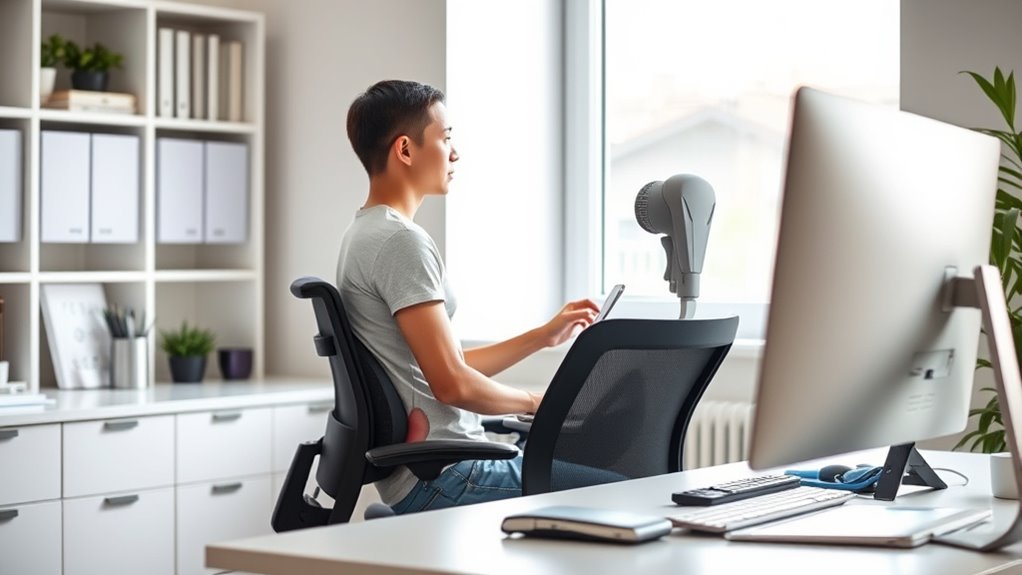

To prevent back pain while working, focus on maintaining good posture by keeping your monitor at eye level, your feet flat on the floor, and your elbows close to your sides. Use ergonomic accessories like a supportive chair, lumbar cushion, and footrest to promote proper alignment. Take regular breaks to stretch and move throughout the day. Small adjustments can make a big difference—stay with us to discover more tips for lasting back health.
Open a free Amazon Business account
Business pricing, bulk buying and tax-exempt orders.
As an affiliate, we earn on qualifying purchases.
Key Takeaways
- Adjust your chair to support your lower back, using lumbar cushions or ergonomic chairs to maintain proper spinal curvature.
- Position your monitor at eye level to prevent neck strain and keep your head aligned with your spine.
- Keep feet flat on the floor or on a footrest, with knees at a 90-degree angle to promote good posture.
- Use an ergonomic keyboard and mouse within easy reach, ensuring wrists stay straight to reduce muscle tension.
- Take regular breaks every 30-60 minutes to stretch, move, and reset your posture for ongoing back health.

Have you ever experienced that sharp, persistent ache in your lower back that just won’t go away? It’s a common problem, especially if you spend long hours sitting at a desk or working on a computer. The good news is that you can take simple steps to reduce back pain by improving your posture and making your workspace more ergonomic. Investing in ergonomic accessories can make a significant difference. Items like adjustable chairs, lumbar support cushions, and sit-stand desks help keep your spine aligned and reduce strain on your muscles. These accessories are designed to support your natural posture, preventing slouching and minimizing the pressure on your lower back.
Ergonomic accessories like adjustable chairs and lumbar cushions support natural posture and reduce lower back strain.
When setting up your workspace, focus on posture correction. Your monitor should be at eye level so you don’t have to tilt your head down or up, which can strain your neck and back. Keep your feet flat on the floor and your knees at a 90-degree angle. Your keyboard and mouse should be within easy reach, allowing you to keep your elbows close to your body and your wrists straight. Maintaining this neutral position reduces unnecessary stress on your spine and muscles. Remember, sitting for prolonged periods isn’t ideal, so take short breaks every 30 to 60 minutes to stand, stretch, and move around. These little pauses help relieve tension and promote better circulation, which can prevent stiffness and pain. Incorporating ergonomic principles into your workspace setup can further enhance your comfort and support proper posture.
Another effective way to support posture correction is to choose the right ergonomic accessories. An ergonomic chair with adjustable height and lumbar support encourages proper alignment of your pelvis and spine. If your chair doesn’t provide enough lower back support, consider adding a lumbar cushion. This small addition helps maintain the natural curve of your lower back, reducing the likelihood of pain. Using a footrest can also improve your posture by ensuring your hips are slightly higher than your knees, promoting better spinal alignment. Additionally, ergonomic accessories like monitor stands or adjustable laptop risers can help you position your screen correctly, so you’re not leaning forward or craning your neck.
Ultimately, improving your posture while working requires awareness and the right tools. Ergonomic accessories are your allies in this effort, helping you maintain proper alignment and reduce strain. Incorporate these adjustments into your daily routine, and you’ll find that back pain becomes less of a concern. Small changes, like adjusting your chair or adding support cushions, can have a lasting impact on your comfort and overall back health. With consistent effort, you can keep that nagging back pain at bay and work more comfortably every day.

Marsail Ergonomic Office Chair: Office Desk Chair with High Back Mesh and Adjustable Lumbar Support Rolling Work Swivel Task Chairs with Wheel 3D Armrests and Headrest
- Fully Adjustable Headrest: 2D adjustable for personalized comfort
- Reclining Backrest: Adjusts from 90° to 120°
- 3D Adjustable Armrests: Customizable for various postures
As an affiliate, we earn on qualifying purchases.
As an affiliate, we earn on qualifying purchases.
Frequently Asked Questions
How Can I Tell if My Chair Is Ergonomically Correct?
You can tell if your chair is ergonomic by checking its height and lumbar support. Adjust the chair height so your feet rest flat on the floor and your knees are at a 90-degree angle. Make sure the lumbar support fits into the curve of your lower back, providing proper back support. When these features are customizable and comfortable, your chair promotes good posture and reduces back pain.
Are There Specific Exercises to Prevent Back Pain?
Yes, you can do specific exercises to prevent back pain. Focus on core strengthening exercises like planks and bridges to support your spine. Incorporate flexibility exercises such as hamstring stretches and gentle yoga to improve mobility. Regularly doing these exercises helps stabilize your posture, reduces strain, and prevents pain. Make them a part of your routine, and you’ll notice less discomfort and better overall back health over time.
How Often Should I Take Breaks During Work?
You should take a break every 30 to 60 minutes during work. Use this time to do stretching routines that target your back and neck, helping to prevent discomfort. Incorporate ergonomic accessories, like adjustable chairs and monitor stands, to support proper posture. Regular breaks combined with these accessories keep your spine aligned, reduce strain, and promote overall comfort, ensuring you stay productive and pain-free throughout your workday.
What Signs Indicate My Posture Is Causing Pain?
If your posture is causing pain, you’ll notice signs like muscle strain, such as tight or aching muscles, and nerve compression, which may cause numbness or tingling in your arms or legs. You might also feel persistent discomfort after long periods of sitting or working at your desk. These symptoms indicate your posture needs adjustment—so pay attention to how your body responds and make ergonomic changes to prevent further pain.
Can Ergonomic Adjustments Improve Overall Productivity?
Did you know that ergonomic tools can boost productivity by up to 25%? Yes, when you use ergonomic tools and practice posture awareness, your overall efficiency improves. Proper ergonomic adjustments reduce discomfort, allowing you to focus better and work longer without fatigue. Investing in supportive chairs, adjustable desks, and monitor stands helps you maintain good posture, which directly enhances your productivity and keeps you comfortable throughout your workday.

CasaZenith Foot Rest, Six Heights Adjustable Foot Rest Under Desk at Work
- Six Adjustable Heights: Customizable for ergonomic comfort
- Ergonomic Design: Supports proper sitting posture
- Reduces Back Stress: Relieves back pain and fatigue
As an affiliate, we earn on qualifying purchases.
As an affiliate, we earn on qualifying purchases.
Conclusion
By applying these ergonomic tips, you’re building a sturdy foundation to support your back every day. Think of your posture as a garden; with consistent care and attention, it can flourish and stay healthy. Remember, small adjustments are like watering your plants—they may seem minor but make a big difference over time. Keep nurturing your body’s well-being, and you’ll find that good posture becomes second nature, keeping your back pain at bay and your life thriving.

Wireless Keyboard and Mouse Combo, 2.4G Ergonomic Wave Keys(Black)
- Wave Ergonomic Design: Fits fingers and relieves wrist strain
- Adjustable Keyboard Stand: Set to most comfortable height
- Wrist Rest Included: Supports long-term use
As an affiliate, we earn on qualifying purchases.
As an affiliate, we earn on qualifying purchases.

Amazon Basics Height Adjustable Monitor Stand Riser with Storage Organizer, 3-Level Stackable Design, Durable ABS Plastic, Supports up to 22lbs, for Monitors & Laptops, Black
- Top Surface Dimensions: 11.6 x 11 inches with tapered design
- 3-Level Height Adjustment: Adjustable heights of 2.87, 4.2, 4.8 inches
- Detachable Legs for Customization: Easily change height levels
As an affiliate, we earn on qualifying purchases.
As an affiliate, we earn on qualifying purchases.
Back to school Picks
back to school
As an affiliate, we earn on qualifying purchases.