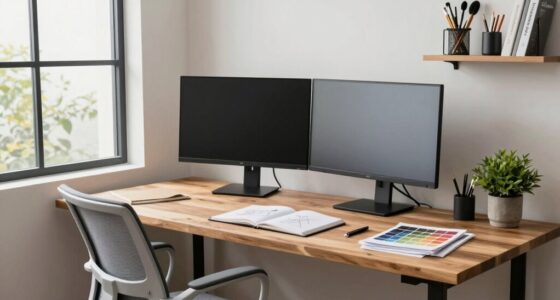
To create a better workspace for reviewing drawings and plans, focus on good lighting by using natural light near windows or daylight-balanced LEDs to reduce eye strain. Invest in ergonomic furniture, like adjustable chairs and sit-stand desks, to stay comfortable during long sessions. Keep your tools within easy reach and organize your space to minimize clutter. Good airflow and clean environment boost focus. Keep exploring for more tips on transforming your workspace into an efficient review area.
Key Takeaways
- Maximize natural light near work areas and use daylight-balanced LEDs to reduce eye strain.
- Select ergonomic furniture with adjustable features to support comfort during long review sessions.
- Position monitors at eye level and keep tools within easy reach to minimize neck and body strain.
- Keep the workspace organized and clutter-free to enhance focus and efficiency.
- Ensure proper ventilation and air quality to maintain comfort and boost concentration.

Ever wondered how a simple change in your workspace can boost your productivity and well-being? The way you set up your environment directly impacts your focus, comfort, and even your creativity when reviewing drawings and plans. To start, prioritize natural lighting. Position your desk near windows so that sunlight naturally illuminates your workspace. Not only does natural light reduce eye strain, but it also helps regulate your circadian rhythm, keeping you alert and energized throughout the day. If windows aren’t an option, consider high-quality, daylight-balanced LED lighting that mimics natural light. Good lighting minimizes glare and shadows, making it easier to see fine details without squinting or straining your eyes, which is essential when working on technical drawings. Ensuring your workspace is designed with ergonomic principles can significantly enhance your comfort and productivity. Equally important is investing in ergonomic furniture. Your chair should offer proper lumbar support, encouraging good posture and preventing back pain during long review sessions. Adjustable features allow you to tailor the chair to your body, keeping your feet flat on the floor and your knees at a 90-degree angle. A sturdy, spacious desk that accommodates your plans and tools without clutter helps maintain focus and efficiency. An ergonomic desk setup minimizes awkward positions, reducing fatigue and discomfort that can distract you from your work. Additionally, consider a sit-stand desk if you prefer alternating between sitting and standing, which can boost circulation and reduce stiffness. The placement of your monitor or workspace tools also matters. Position your monitor at eye level, about an arm’s length away, to prevent neck strain and promote comfortable viewing angles. Keep frequently used tools within easy reach to avoid unnecessary stretching or twisting. Use a document holder to keep plans and drawings at eye level, so you can review details without constantly looking down or up, which can cause neck strain over time. Creating an organized workspace is essential. Clear your desk of unnecessary clutter and use storage solutions to keep papers, tools, and plans neatly arranged. A clean, well-organized environment reduces distractions and helps you focus on the task at hand. Incorporate personal touches like plants or artwork, but keep them minimal to avoid visual clutter. A balanced workspace with good lighting, ergonomic furniture, proper monitor placement, and organization fosters an environment where you can review drawings efficiently and comfortably. Ensuring your workspace also includes appropriate lighting can further enhance your ability to see fine details clearly and reduce eye fatigue. Additionally, incorporating proper ventilation can improve overall comfort and air quality, contributing to better focus during long review sessions. Maintaining proper air quality through ventilation is vital for sustained concentration and health.
ergonomic adjustable office chair
As an affiliate, we earn on qualifying purchases.
As an affiliate, we earn on qualifying purchases.
Frequently Asked Questions
What Are the Best Tools for Digital Drawing Review?
You should use tools like Bluebeam Revu or Adobe Acrobat for digital annotation, as they offer robust features for marking up drawings efficiently. Pair these with collaborative platforms like Autodesk BIM 360 or PlanGrid, which enable real-time sharing and feedback. These tools streamline your review process, improve communication, and keep everyone aligned, making it easier to catch errors early and ensure your plans are accurate and thorough.
How Can I Improve Lighting for Detailed Plan Reviews?
You can improve lighting for detailed plan reviews by prioritizing natural light, which reduces eye strain and enhances clarity. Pair it with adjustable lighting options, like task lamps or dimmable overhead lights, to customize brightness throughout the day. This combination helps you see fine details clearly, preventing fatigue. Remember, proper lighting isn’t just about visibility; it’s about creating an environment that supports focus, accuracy, and comfort during your reviews.
What Ergonomic Furniture Reduces Fatigue During Long Reviews?
You should choose ergonomic chairs and adjustable desks to reduce fatigue during long reviews. Ergonomic chairs provide proper lumbar support and promote good posture, preventing discomfort. Adjustable desks let you switch between sitting and standing, reducing strain on your back and neck. By setting your workspace with these furniture pieces, you’ll stay comfortable and alert throughout extended drawing and plan review sessions.
How to Organize Multiple Drawing Versions Efficiently?
You should implement a clear file versioning system and stick to consistent naming conventions to organize multiple drawing versions efficiently. Use dedicated folders for different projects and stages, ensuring each version is easy to locate. Regularly update and archive old files to prevent clutter. This approach helps you quickly identify the latest drawings, minimizes confusion, and streamlines your review process, keeping your workspace neat and productive.
Which Noise Levels Are Ideal for Focused Review Work?
For focused review work, keep noise levels low—ideally between 40-50 decibels—so you can concentrate without distractions. Soundproofing solutions, like acoustic paneling, are essential to block out external noise and minimize sound reverberation. This creates a quiet, comfortable environment that enhances your ability to analyze drawings and plans accurately. Implementing these measures guarantees your workspace remains peaceful, allowing you to work efficiently and with precision.
As an affiliate, we earn on qualifying purchases.
Conclusion
By implementing these tips, you set yourself up for success in reviewing drawings and plans. A well-organized, comfortable workspace helps you work smarter, not harder. Remember, a cluttered desk is like a tangled web—difficult to navigate and easy to get lost in. Keep your space tidy and your tools within reach. When your environment supports your workflow, you’ll find it easier to focus and deliver your best work every time.
As an affiliate, we earn on qualifying purchases.
As an affiliate, we earn on qualifying purchases.