Vertical mice are genuinely helpful for reducing wrist pain and promoting better ergonomics. Their design encourages your hand to stay in a natural, handshake-like position, which minimizes wrist twisting and pressure. Many users find they can work or game longer comfortably, with less fatigue and discomfort. While it may take a little time to adapt, these mice offer real benefits for your long-term wrist health. Keep exploring to see how they can make a difference for you.

Get your wardrobe favorites delivered free with Prime
- Fast, free delivery on millions of items
- Prime Video, Amazon Music and more included
- Member-only deals all year
Key Takeaways
- Vertical mice promote natural hand posture, reducing wrist twisting and pressure, which can alleviate wrist pain and prevent injuries.
- They are designed to support ergonomic comfort during long work or gaming sessions, potentially decreasing fatigue.
- Many users report smooth adaptation and decreased discomfort, making vertical mice a practical solution for wrist strain.
- While some skepticism exists, evidence suggests vertical mice can effectively improve wrist health without compromising performance.
- Investing in a vertical mouse can enhance comfort, reduce injury risk, and support long-term wrist health for frequent users.
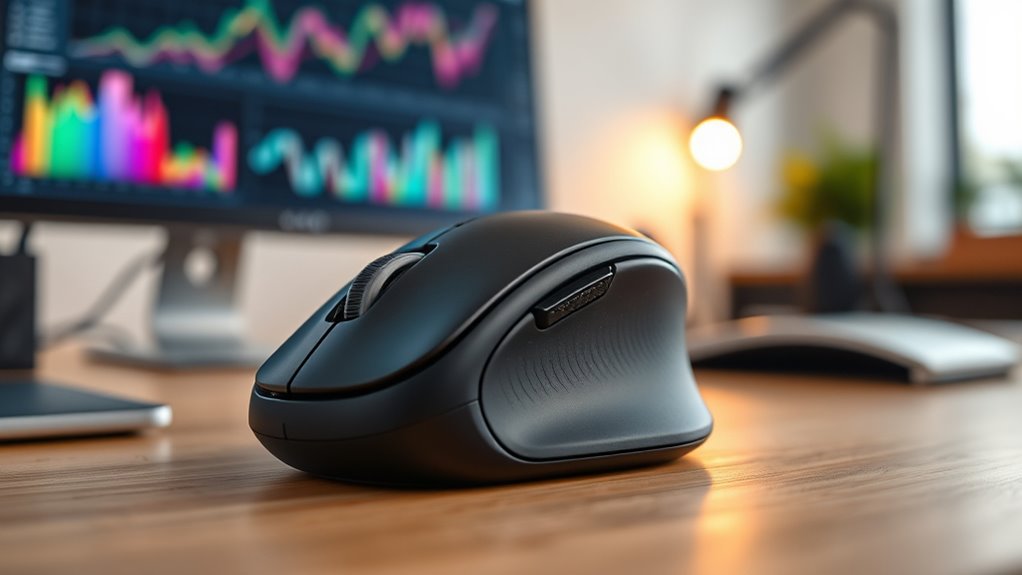
Have you ever experienced discomfort or pain after long hours of using a traditional mouse? If so, you’re not alone. Many people who spend significant time at their computers find that standard mice can cause wrist strain, leading to discomfort or even chronic pain. That’s where the vertical mouse comes into play. Designed with ergonomic principles in mind, a vertical mouse aims to reduce strain by encouraging a more natural hand position. Unlike traditional mice, which often require you to twist your wrist inward, a vertical mouse keeps your hand in a handshake-like posture, minimizing twisting and pressure on the wrist. This ergonomic design helps prevent repetitive strain injuries and makes long sessions at your desk much more comfortable.
A vertical mouse promotes a natural hand position, reducing wrist strain and preventing repetitive injury during long computer sessions.
But you might wonder whether switching to a vertical mouse impacts your gaming performance. Many gamers worry that an ergonomic design might compromise precision or speed, but that’s often a misconception. Today’s vertical mice come with features tailored for gaming, such as high DPI settings, customizable buttons, and responsive tracking. When chosen correctly, a vertical mouse can actually enhance your gaming experience by offering better control and reducing fatigue during extended play. You won’t have to sacrifice performance for comfort; many models are built to meet the demands of competitive gaming, ensuring that your movements remain accurate and swift.
Switching to a vertical mouse might feel different at first, especially if you’re used to traditional designs. However, the changeover tends to be smooth because many models are ergonomically shaped to fit comfortably in your hand. Once accustomed, you’ll notice less tension in your wrist and forearm, and your hand won’t tire as quickly. This comfort boost can lead to improved focus and quicker reaction times, especially during long gaming sessions or intensive work periods. Plus, the natural hand position reduces the risk of developing conditions like carpal tunnel syndrome or tendonitis, making it a healthier choice in the long run.
While some skeptics argue that vertical mice are just a trend, the evidence suggests they’re more than hype—they’re a practical solution for many users. Whether you’re working at a desk for hours a day or engaging in competitive gaming, an ergonomic design that promotes a natural hand position can make a real difference. It’s worth considering if wrist pain or fatigue has been a persistent issue for you. Ultimately, a vertical mouse isn’t about sacrificing functionality; it’s about optimizing comfort without compromising performance. If you’re looking for a device that supports your health and keeps your gaming sharp, a vertical mouse might just be the upgrade you need.
ergonomic vertical mouse for wrist pain
As an affiliate, we earn on qualifying purchases.
As an affiliate, we earn on qualifying purchases.
Frequently Asked Questions
Can Vertical Mice Improve Long-Term Wrist Health?
Yes, vertical mice can improve your long-term wrist health by promoting better ergonomic benefits and wrist alignment. They encourage a more natural hand position, reducing strain and preventing repetitive stress injuries. Using a vertical mouse regularly helps you maintain proper wrist posture, which can lead to less pain and discomfort over time. If you prioritize ergonomics, switching to a vertical mouse might be a smart move for your wrist health.
Are Vertical Mice Suitable for Gaming or Fast-Paced Tasks?
Did you know that only 20% of vertical mice are designed for gaming? If you’re into fast-paced tasks, vertical mice might not match traditional gaming mice in response speed or gaming compatibility. While they excel at reducing wrist strain, their response times can lag during rapid movements. So, if quick reflexes matter most, stick with a conventional mouse; but for comfort, vertical options can still work well.
What Are the Costs Compared to Traditional Mice?
Vertical mice tend to be more expensive than traditional mice, with price differences often ranging from 20% to 50%. You’ll find basic models starting around $30, while premium options can cost over $100. The higher cost reflects ergonomic features designed to reduce wrist strain. If you’re considering long-term comfort, investing in a vertical mouse might be worthwhile, but compare prices carefully to find one that fits your budget.
Do Vertical Mice Require Special Software or Drivers?
You won’t usually need special software or drivers for vertical mice, as most are compatible with standard driver compatibility on your computer. However, some models offer software customization options to adjust button functions and sensitivity. Check the manufacturer’s instructions to see if additional software is required, but generally, vertical mice work seamlessly with your existing operating system, making setup quick and straightforward without needing extra drivers.
How Do Vertical Mice Fit in Ergonomic Office Setups?
You might think vertical mice disrupt your ergonomic desk setup, but they actually enhance mouse positioning. They fit seamlessly into ergonomic office setups by aligning your wrist naturally, reducing strain. Incorporate a vertical mouse into your workspace to maintain proper posture and improve comfort. Just make certain your ergonomic desk has enough space and adjust your monitor height to complement your new mouse for ideal ergonomic support.
As an affiliate, we earn on qualifying purchases.
Conclusion
Ultimately, choosing a vertical mouse is like gently steering your hand toward calmer waters. It might not turn every tide, but it offers a softer path, easing wrist tension and inviting relief. With a little patience, this subtle shift can help you glide more smoothly through your day, turning discomfort into a quiet whisper rather than a loud cry. Sometimes, a gentle change is all it takes to find a more comfortable, flowing rhythm in your work.
ergonomic computer mouse for long hours
As an affiliate, we earn on qualifying purchases.
As an affiliate, we earn on qualifying purchases.
vertical mouse with customizable buttons
As an affiliate, we earn on qualifying purchases.
As an affiliate, we earn on qualifying purchases.
Halloween Picks
halloween
As an affiliate, we earn on qualifying purchases.