

Time blocking simplifies your schedule by dividing your day into focused segments for specific tasks, making it easier to prioritize high-value activities. You can minimize distractions by turning off notifications and creating a quiet workspace. Visual cues and color coding help you assess tasks quickly, while dedicating blocks of time for deep work and admin tasks keeps you on track. Keep exploring to discover how refining your time blocks can maximize your productivity even further.
Key Takeaways
- Break your day into dedicated time blocks for specific tasks to create a clear, manageable schedule.
- Prioritize high-impact tasks during your peak energy periods for maximum productivity.
- Minimize distractions by turning off notifications and setting specific times for email and social media.
- Use visual cues and color coding to organize tasks and easily identify priorities.
- Review and adjust your time blocks regularly to maintain schedule effectiveness and accommodate changing priorities.
Have you ever felt overwhelmed by your to-do list and unsure how to get everything done? If so, you’re not alone. Many people struggle with managing their daily tasks and staying focused. One effective way to regain control is through task prioritization. By identifying what truly matters and tackling high-priority tasks first, you prevent less important activities from consuming your time. When you prioritize, you create a clear roadmap, which reduces decision fatigue and helps you stay on track. Pairing task prioritization with distraction management is essential. Distractions can easily derail your day, pulling you away from meaningful work and wasting precious minutes. Recognizing common distractions—like social media, email notifications, or chatting with colleagues—and actively minimizing them can dramatically boost your productivity. Turn off non-essential notifications, set specific times to check emails, and create a quiet workspace. Incorporating techniques such as color accuracy can help you better assess visual information for more efficient planning and execution of your tasks.
Now, integrating these strategies into your daily routine becomes easier with time blocking. This method involves dividing your day into dedicated blocks of time, each assigned to a specific task or group of tasks. When you plan your day with time blocks, you’re fundamentally creating a structured schedule that aligns with your priorities. For example, allocate mornings to deep work that requires full concentration—like writing or strategic planning—and reserve afternoons for meetings or administrative tasks. The beauty of time blocking is that it gives you a visual overview of your day, making it easier to see where your energy and focus are best spent. It also helps you stick to your task prioritization, ensuring that high-priority activities get the time they deserve.

The Time-Block Planner (Second Edition): A Daily Method for Deep Work in a Distracted World
As an affiliate, we earn on qualifying purchases.
As an affiliate, we earn on qualifying purchases.
Frequently Asked Questions
How Do I Handle Unexpected Urgent Tasks During Scheduled Blocks?
When unexpected urgent tasks arise, prioritize flexibility by adjusting your schedule. Shift less critical tasks to later or create contingency plans for such disruptions. If possible, allocate buffer periods within your time blocks to handle surprises. This approach helps you stay focused on high-priority items without feeling overwhelmed, ensuring you adapt smoothly to urgent demands while maintaining overall productivity.
Can I Adjust My Time Blocks Once the Week Has Started?
Did you know that 80% of people find schedule flexibility boosts productivity? Yes, you can definitely adjust your time blocks once the week starts. Flexibility adjustments allow you to respond to unexpected tasks or changing priorities without stress. Just review your plan daily, move or resize blocks as needed, and maintain focus on your priorities. Staying adaptable guarantees your schedule remains effective and realistic, even in dynamic work environments.
What Tools Are Best for Digital Time Blocking?
You can definitely adjust your time blocks using digital planners and time management apps. These tools make it easy to reschedule, shift, or modify your blocks on the fly. Popular options include Google Calendar, Todoist, and Notion, which offer flexibility and syncing across devices. With these apps, you stay organized and can adapt your schedule effortlessly, ensuring your productivity remains high even when plans change.
How Do I Prevent Over-Scheduling in My Time Blocks?
Don’t bite off more than you can chew. To prevent over-scheduling, prioritize tasks by importance and allocate a time buffer for unexpected delays. Be realistic about what you can accomplish in each block, and leave room for breaks or overflow. Regularly review your schedule, adjusting tasks as needed. This way, you’ll stay productive without feeling overwhelmed, keeping your day manageable and focused.
What’s the Best Way to Review and Optimize My Schedule?
You should regularly conduct schedule reflection to identify what’s working and what’s not. Start by reviewing your productivity analysis, noting tasks that took longer or shorter than expected. Adjust your time blocks accordingly to improve efficiency. Make this a weekly habit, so you stay aligned with your goals, prevent over-scheduling, and maximize your productivity. This ongoing review keeps your schedule flexible and effective, ensuring continuous improvement.
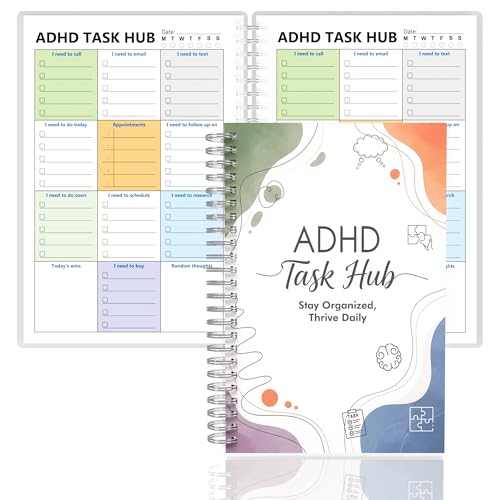
ADHD Planner for Focus & Productivity: Task Management Hub with Color-Coded Sections for Calls, Emails, To-Dos, Appointments & More. Reduce Overwhelm. A5, Durable Cover, 100gsm Paper, Spiral Bound
✅ SCIENTIFICALLY STRUCTURED FOR ADHD – Designed specifically to combat ADHD-related challenges, our "ADHD Task Hub" uses color-coded…
As an affiliate, we earn on qualifying purchases.
As an affiliate, we earn on qualifying purchases.
Conclusion
By mastering time blocking, you transform chaos into clarity, turning scattered moments into a well-orchestrated symphony. Imagine your day as a tidy garden, each task a blooming flower, perfectly spaced and nurtured. Instead of drowning in endless to-dos, you’re sailing smoothly on a clear, steady stream. Embrace this simple method, and watch your productivity flourish like a vibrant sunrise, illuminating your path and making every moment count.

Soundcore by Anker Q20i Hybrid Active Noise Cancelling Headphones, Wireless Over-Ear Bluetooth, 40H Long ANC Playtime, Hi-Res Audio, Big Bass, Customize via an App, Transparency Mode
Block the World, Keep the Music: Four built-in mics work together to filter out background noise — whether…
As an affiliate, we earn on qualifying purchases.
As an affiliate, we earn on qualifying purchases.

gianotter Wood Desk Organizers and Accessories with File Holder, 4-Tier Desk Accessories & Workspace Organizers with Drawer and Pen Holder, Desk Reference Organizer (Wood)
【Space Saving】: The compact design of this wood desk organizer maximizes vertical space while keeping all office supplies…
As an affiliate, we earn on qualifying purchases.
As an affiliate, we earn on qualifying purchases.