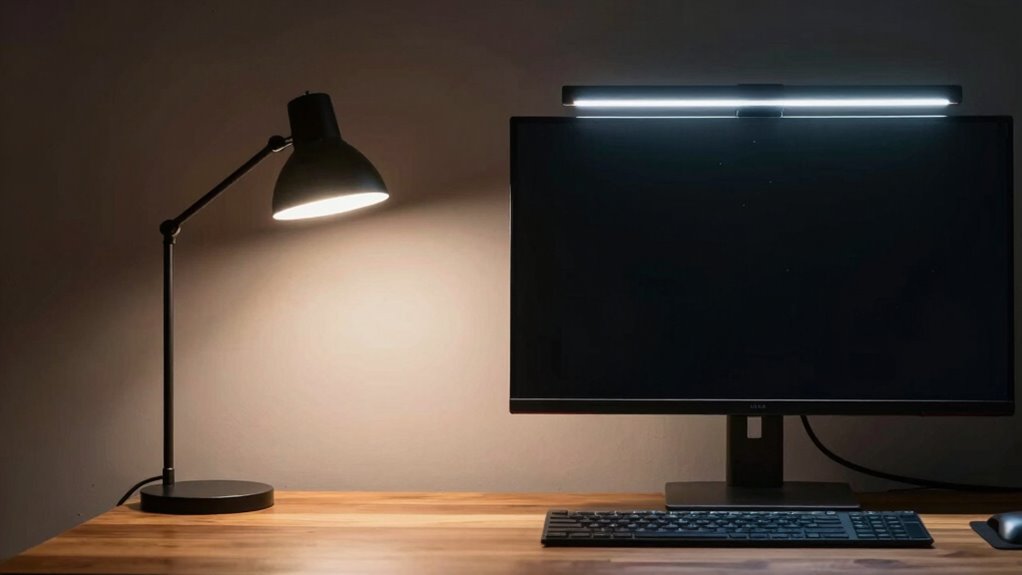

You can’t go wrong choosing between task lamps and monitor light bars, as both improve desk lighting but serve different needs. Task lamps offer adjustable, focused light, helping you direct illumination precisely and enhance ergonomic comfort. Monitor light bars provide a sleek, even light across your workspace, reducing glare and eye strain. Consider your workspace, style, and mood. To discover which option best suits your setup and how they compare, keep exploring below.

Get your wardrobe favorites delivered free with Prime
- Fast, free delivery on millions of items
- Prime Video, Amazon Music and more included
- Member-only deals all year
Key Takeaways
- Task lamps offer adjustable, focused lighting for specific areas, while monitor light bars provide uniform illumination across the workspace.
- Task lamps enhance ergonomic posture by directing light precisely, whereas light bars reduce clutter on the desk surface.
- Light bars are sleek, space-saving, and easy to install, whereas task lamps may be more customizable in light direction and intensity.
- Task lamps can serve as decorative elements, adding style, while monitor light bars primarily prioritize functionality.
- For extended work sessions, task lamps reduce eye strain through adjustable focus, whereas light bars provide consistent ambient lighting.

When it comes to illuminating your workspace, choosing the right desk lighting can markedly impact your comfort and productivity. Two popular options are task lamps and monitor light bars, each offering distinct advantages. Your decision should consider factors like ergonomic benefits and aesthetic appeal. Task lamps are highly versatile, allowing you to direct light exactly where you need it. They often feature adjustable arms and heads, enabling you to customize the angle and intensity. This flexibility helps reduce eye strain, especially during long work sessions, by providing focused illumination without glare. As a result, task lamps support ergonomic benefits by promoting proper posture—you’re less likely to lean forward or strain your neck when the light is well-positioned. Their physical presence can also add a touch of aesthetic appeal to your desk, especially if you choose a stylish design that complements your workspace decor. Additionally, lighting options play a crucial role in creating an ergonomic workspace, ultimately enhancing your comfort and efficiency. Incorporating the right lighting can also help prevent eye strain, which is common during prolonged screen time. Proper lighting choices can further contribute to an overall productive environment, making your workspace more comfortable and inviting.
As an affiliate, we earn on qualifying purchases.
Frequently Asked Questions
Which Lighting Option Is More Energy-Efficient?
Monitor light bars are more energy-efficient than task lamps because they typically have lower energy consumption and better power efficiency. They focus light directly on your workspace without illuminating the entire room, reducing unnecessary energy use. Task lamps, while adjustable, often consume more power due to larger bulbs or multiple settings. If saving energy is your priority, opt for a monitor light bar to maximize power efficiency and minimize electricity use.
How Do Task Lamps Affect Eye Strain Differently?
Imagine your eyes as tiny, overworked detectives, desperately trying to solve the case of blurry vision. Task lamps help by reducing glare and adjusting light temperature, easing eye strain. They direct focused light exactly where you need it, preventing your eyes from battling harsh, uneven illumination. This targeted approach keeps your eyes comfortable, allowing you to work longer without the headache-inducing fatigue caused by poor lighting.
Are Monitor Light Bars Compatible With All Monitor Sizes?
Monitor light bars are generally compatible with most monitor sizes, but you should check their monitor compatibility beforehand. They typically work well with standard-sized screens, yet size limitations can apply, especially for ultra-wide or very small monitors. To guarantee a good fit, measure your monitor’s width and verify the light bar’s maximum size capacity. This way, you avoid compatibility issues and achieve ideal lighting for your workspace.
Can Both Lighting Types Be Used Simultaneously?
Yes, you can use both task lamps and monitor light bars simultaneously to achieve dual placement and ideal lighting balance. Combining these lighting options helps eliminate shadows, reduce eye strain, and create a well-lit workspace. Position the task lamp for focused, direct light, while the monitor light bar provides ambient illumination. Just make certain the lighting levels complement each other, avoiding glare or uneven brightness for a comfortable, efficient working environment.
Which Option Offers Better Adjustability for Different Tasks?
Task lamps generally offer better adjustability for different tasks because you can easily change their position, direction, and sometimes even the brightness and color temperature. This provides greater lighting flexibility, allowing you to tailor the light to specific activities. Monitor light bars tend to be more fixed, offering less adjustability but still providing consistent illumination. For varied tasks, a task lamp’s customizable features make it the superior choice.
As an affiliate, we earn on qualifying purchases.
Conclusion
When choosing between task lamps and monitor light bars, consider your workspace needs and lighting preferences. Research shows that proper desk lighting can boost productivity by up to 20%, so it’s worth investing in the right solution. Task lamps offer flexibility with adjustable brightness and direction, while light bars provide a sleek, space-saving option. Ultimately, selecting the right lighting enhances focus and comfort, making your workspace more efficient and enjoyable.
As an affiliate, we earn on qualifying purchases.
As an affiliate, we earn on qualifying purchases.
Fall Picks
fall essentials
As an affiliate, we earn on qualifying purchases.