When searching for the best wireless mechanical keyboards for office use, the key considerations are reliability, typing comfort, and connectivity versatility. The Keychron K4 stands out as the best overall pick thanks to its balanced features and compatibility. For those prioritizing silent operation, the SOLAKAKA KI99 Pro offers quiet switches without sacrificing performance. Meanwhile, the Logitech MX Mechanical provides a premium experience with quiet keys and extensive device support. As you compare options, you’ll need to weigh tradeoffs like battery life, build quality, and feature sets. Keep reading for a detailed breakdown of these top choices and what to look for in a wireless office keyboard.
Key Takeaways
- The best wireless mechanical keyboards for office use balance connectivity options with typing comfort and build quality.
- Silent switches and quiet operation remain a common feature in top picks, reducing office noise distractions.
- Most high-end options provide excellent compatibility across devices, but often at a higher price point.
- Hot-swappable switches are increasingly popular, offering customization without soldering.
- Tradeoffs often involve battery life versus feature set; premium models tend to have shorter battery spans but more advanced features.


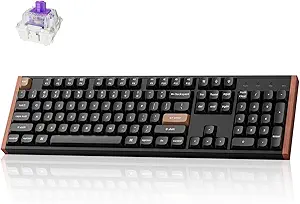




More Details on Our Top Picks
RK Royal Kludge S98 Mechanical Keyboard with Smart Display & Knob, 96% Wireless, Hot Swappable, Top Mount, PBT Keycaps
The RK Royal Kludge S98 stands out for its compact 96% layout combined with advanced features like a smart display and customizable knob, making it ideal for users who want a multifunctional device without sacrificing desk space. Compared to the Keychron K4, it offers more customization options with the sound-absorbing foam and a more integrated control interface. However, its small screen can limit display flexibility, and the premium features come at a higher cost. The hot-swappable switches and Bluetooth 5.0 connectivity make it versatile for office settings, though new users may face a slight learning curve in mastering the controls.
Pros:- Wireless connectivity with Bluetooth 5.0, 2.4G, and USB-C for flexible use
- Hot-swappable switches allow easy customization and repairs
- Smart display provides useful info and quick controls
- Sound-absorbing foam reduces typing noise
Cons:- Small display limits the amount of information shown
- Premium price may be a concern for budget-conscious buyers
Best for: Professionals who need a compact, feature-rich keyboard with customization and multi-device connectivity.
Not ideal for: Users seeking a straightforward, budget-friendly option without advanced features or a display.
- Connection Modes:Bluetooth 5.0, 2.4G, USB-C
- Layout:96% Top Mount
- Switch Compatibility:Hot Swappable (3-pin/5-pin)
- Keycaps:Double-shot PBT
- Features:Smart display, customizable knob, sound-absorbing foam
- Battery Status Display:Yes
Bottom line: This keyboard is best suited for tech-savvy professionals who value customization and multifunctionality in a compact form.
Keychron K4 96% Layout Wireless Mechanical Keyboard with Backlight, Mac & Windows Compatibility
The Keychron K4 offers a balanced blend of performance and affordability, with a 96% layout that suits both office productivity and light gaming. Its Bluetooth 5.1 connection and long-lasting 4000mAh battery make it a reliable choice for multi-device setups, especially for users who switch between Mac and Windows. While it lacks some advanced features of the RK S98, such as a display or sound absorption, its straightforward design and durable switches provide a solid typing experience at a more accessible price point. The backlighting is simple but effective, though it offers limited customization options compared to higher-end models.
Pros:- Wireless Bluetooth 5.1 with multi-device switching
- Long battery life up to 240 hours with backlight off
- Compact 96% layout saves desk space
- Compatible with Mac and Windows with included keycaps
Cons:- Primarily designed for productivity, not heavy gaming
- Limited backlight customization options
Best for: Office workers and students who want a versatile, reliable wireless keyboard compatible across platforms.
Not ideal for: Gamers or users seeking extensive backlight customization or additional multimedia features.
- Layout:96% (100 keys)
- Connectivity:Bluetooth 5.1, USB Type-C wired
- Backlight:White LED
- Battery:4000 mAh
- Switch Type:Keychron Super Brown
- Compatibility:Mac and Windows
Bottom line: This keyboard provides excellent value for office users who need multi-platform compatibility and dependable performance.
SOLAKAKA KI99 Pro Wireless Mechanical Keyboard with Silent Switches and RGB Backlit
The SOLAKAKA KI99 Pro is designed for users seeking a quiet yet vibrant typing experience, with its silent hot-swappable switches and full RGB lighting. Its 96% layout and support for multiple connection modes—Bluetooth, 2.4G, and Type-C—make it versatile for different devices and environments. The inclusion of software for full customization makes it appealing to those who want personalized lighting effects and macro programming, but this adds complexity for users unfamiliar with setup processes. Compared to the AULA F108 PRO, it emphasizes quieter operation and aesthetic customization, though at a higher price.
Pros:- Supports multiple connection modes including Bluetooth and 2.4G
- Hot-swappable silent switches for quiet operation
- Full RGB with side light bars for vibrant customization
- Large 10,000mAh battery supports extended use
Cons:- Requires software for full customization, potentially complex for some users
- Higher price point limits accessibility for budget buyers
Best for: Office users who value noise reduction and visual customization for a distraction-free workspace.
Not ideal for: Budget-conscious buyers or those who prefer plug-and-play simplicity without needing software setup.
- Connection Modes:Bluetooth 5.0, 2.4G, Type-C
- Battery:10,000mAh
- Layout:96%
- Switch Type:Silent, hot-swappable
- Lighting:Full RGB with side bars
- Compatibility:Windows, macOS, PC, smartphone
Bottom line: Ideal for professionals who prioritize quiet, customizable lighting in a compact, wireless format.
AULA F108 PRO Wireless Mechanical Keyboard with Screen & Knob, RGB Backlit, 104 Keys, 8000mAh Battery, Hot-Swappable Switches
The AULA F108 PRO combines a full-size layout with innovative features like a high-definition TFT display and multi-function knob, making it suitable for complex workflows and multitasking. Its RGB backlighting adds aesthetic appeal, while the hot-swappable switches provide customization for different preferences. Compared to smaller layouts like the Keychron K4, it offers a more comprehensive set of keys for office tasks, but its larger size may be less suitable for cramped desks. The 8000mAh battery supports all-day use, though some features require software setup and may have limited Linux support.
Pros:- Full 104-key layout with programmable keys
- High-definition TFT display for real-time info
- Hot-swappable switches for customization
- Large 8000mAh battery for extended use
Cons:- Software support mainly for Windows, limited Linux compatibility
- Larger footprint may be unsuitable for small desks
Best for: Office professionals who need a full-size keyboard with advanced control features for multitasking and customization.
Not ideal for: Those with limited desk space or who prefer minimalistic setups without extra screens or knobs.
- Keyboard Layout:Full Size (104 keys)
- Battery Capacity:8000mAh
- Connection Modes:Bluetooth 5.0, 2.4GHz, USB-C wired
- Switch Compatibility:Hot-swappable
- Display:High-definition TFT
- Additional Features:Programmable keys, macro support
Bottom line: This keyboard caters to professionals who want a feature-rich, full-sized keyboard with visual controls and customization options.
Keychron K10 HE Hall Effect Wireless Mechanical Keyboard with Magnetic Switches, Hot Swappable, RGB, Aluminum & Wood Frame, Full-Size for Mac, Windows, Linux
The Keychron K10 HE introduces Hall Effect magnetic switches, elevating durability and responsiveness beyond traditional mechanical switches. Its tri-mode connectivity—Bluetooth 5.2, 2.4 GHz, and wired—makes it adaptable to nearly any setup, while the full-size layout ensures no functionality is sacrificed. The use of premium materials like aluminum and wood frames adds a sophisticated aesthetic, appealing for users who want both form and function. Compared to the RK S98, it emphasizes longevity and cross-platform compatibility, though the technical setup for switch customization might be daunting for some users. Its higher price reflects the advanced switch technology and build quality.
Pros:- Hall Effect magnetic switches for outstanding durability
- Tri-mode connectivity for flexible device pairing
- Premium aluminum and wood frame for aesthetic appeal
- Hot-swappable switches for easy customization
Cons:- Requires technical knowledge for switch and customization setup
- Higher price point compared to standard mechanical keyboards
Best for: Tech enthusiasts and professionals needing a durable, high-performance keyboard compatible across multiple operating systems.
Not ideal for: Budget shoppers or those seeking a straightforward plug-and-play experience without extensive setup.
- Layout:Full-Size
- Connectivity:Bluetooth 5.2, 2.4 GHz, Type-C wired
- Switch Type:Hall Effect magnetic, hot-swappable
- Actuation Range:0.2mm to 3.8mm
- Keycaps:Double-shot PBT
- Frame Material:Aluminum and wood
Bottom line: This keyboard is perfect for users who prioritize longevity, cross-platform compatibility, and premium materials, despite a steeper learning curve and cost.
RK Royal Kludge RK96 RGB Limited Edition Mechanical Keyboard, 96 Keys, Wireless Triple Mode BT5.0/2.4G/USB-C, Hot Swappable, with Wrist Rest
This compact 96% keyboard stands out for its versatile triple-mode connectivity, making it ideal for switching seamlessly between multiple devices. Unlike the Logitech MX Mechanical, which relies solely on Bluetooth, the RK96 offers wired, Bluetooth, and 2.4G wireless options, catering to diverse office setups. Its hot-swappable switches provide easy customization without soldering, a feature missing in many office-focused models. The magnetic ergonomic wrist rest enhances comfort during long typing sessions. However, the limited 96 keys exclude some full-size functions, which might be a drawback for users needing dedicated media or navigation keys. Additionally, the setup can be complex for beginners, especially with software for customization.
Pros:- Versatile triple-mode wireless connectivity for flexible device switching
- Hot-swappable switches enable easy customization
- Ergonomic magnetic wrist rest for prolonged comfort
- Built-in USB pass-through ports for added convenience
Cons:- Limited to 96 keys, missing some full-size keys
- Potential complexity for users unfamiliar with customization software
Best for: Office workers who value flexibility and customization in a compact form factor.
Not ideal for: Users needing full-size keyboards with dedicated function keys or those uncomfortable with multi-step setup processes.
- Keys:96
- Connectivity:Bluetooth 5.0, 2.4G, USB-C wired
- Switch Type:Hot-swappable
- Wrist Rest:Magnetic ergonomic wrist rest
- Ports:2 USB pass-through, 1 Type-C
- Keycaps:Double-shot PBT
Bottom line: This pick suits office users who want a compact yet versatile wireless keyboard with customization options.
Logitech G413 SE Full-Size Mechanical Gaming Keyboard – Backlit, Tactile Switches, Anti-Ghosting, Windows & macOS Compatible
The Logitech G413 SE offers a full-size layout with durable PBT keycaps, making it a reliable choice for daily office tasks and occasional gaming. Its white LED backlighting provides clear visibility in low-light environments, though it doesn’t offer RGB lighting customization like the AULA F99 Pro. Its anti-ghosting with 6-key rollover ensures accurate input during rapid typing or multi-key commands, comparable to the anti-ghosting features on more gaming-oriented keyboards. Compared to the Logitech MX Mechanical, which emphasizes multi-device connectivity, the G413 SE is more focused on durability and straightforward performance, but lacks wireless options, limiting mobility. Its sleek brushed aluminum top case lends a premium feel, but the wired connection could be less flexible in an office setting.
Pros:- Durable PBT keycaps resist wear and heat
- Reliable anti-ghosting with 6-key rollover
- Sleek brushed aluminum design adds premium feel
- Includes media controls and backlit keys
Cons:- Limited lighting customization options
- No wireless connectivity, restricting mobility
- Potentially higher price compared to membrane keyboards
Best for: Office users who prioritize durability, reliability, and a traditional full-size layout.
Not ideal for: Those seeking a wireless setup or a more minimalist, compact keyboard for tight desk spaces.
- Type:Mechanical Gaming Keyboard
- Switch Type:Tactile Mechanical Switches
- Keycaps:PBT, heat- and wear-resistant
- Backlighting:White LED
- Connectivity:USB
- Material:Black brushed aluminum top case
Bottom line: This keyboard is best suited for office environments that value durability and full-size functionality over wireless convenience.
Logitech MX Mechanical Wireless Illuminated Performance Keyboard, Tactile Quiet Switches, Backlit Keys, Bluetooth, USB-C, Mac/Windows/Linux/iOS/Android, Graphite
The Logitech MX Mechanical excels in multi-device versatility, allowing seamless switching between Windows, macOS, Linux, and mobile devices via Bluetooth or Logi Bolt. Its low-profile tactile quiet switches offer a comfortable typing experience suitable for extended office use, outperforming traditional high-profile mechanical keyboards in ergonomics. The smart backlit keys adjust automatically to ambient light, reducing eye strain. Compared with the RK96, which offers more hardware customization, the MX Mechanical prioritizes ecosystem integration and simplicity. However, it requires Logi Options+ software for full key customization, which might be a minor inconvenience. Its long battery life—up to 15 days—adds convenience, but it’s heavier at over 29 ounces, which could affect portability for some.
Pros:- Comfortable low-profile tactile quiet switches
- Smart backlit keys that adjust to lighting
- Multi-device connectivity with easy switching
- Long battery life with quick USB-C charging
Cons:- Requires Logi Options+ software for full customization
- Not compatible with Logitech Unifying technology
- Battery life can vary depending on backlight use
Best for: Professionals who switch between multiple devices and value quiet, ergonomic typing in a wireless format.
Not ideal for: Users who prefer wired keyboards or need extensive macro customization without software limitations.
- Switch Type:Tactile Quiet
- Backlit Keys:Yes, auto-adjusting
- Connectivity:Bluetooth, USB-C, Logi Bolt receiver
- Device Compatibility:Windows, macOS, Linux, Chrome OS, iOS, iPadOS, Android
- Battery Life:Up to 15 days (full), 10 months (backlight off)
- Material:Includes 45% recycled plastic
Bottom line: This keyboard is ideal for multi-device users seeking quiet, ergonomic wireless typing across various platforms.
AULA F99 Pro Wireless Mechanical Keyboard with Knob, RGB Backlit, Hot Swappable, Gasket Structure, Tri-Mode Connectivity
The AULA F99 Pro stands out for its tri-mode connectivity—Bluetooth, 2.4GHz, and wired—making it adaptable for various office setups. Its gasket structure provides a softer typing feel compared to rigid designs, while the RGB backlighting with 16 effects adds a customizable aesthetic. The hot-swappable switches allow for easy personalization, similar to the RK96, but with an added multifunction control knob for volume or macro adjustments, a feature absent in many office keyboards. Its large 8000mAh battery supports extended use, yet the setup for macros and lighting can be complex, especially for users without experience in driver installation. Price-wise, it may be slightly higher due to its feature set, which could be overkill for basic office tasks.
Pros:- Tri-mode connectivity supports multiple devices
- Hot-swappable switches for easy customization
- Gasket structure offers softer typing feel
- Multifunction knob for volume and macro control
Cons:- Setup can be complex with driver installation
- Higher price point compared to basic models
- Potentially over-featured for simple typing needs
Best for: Users who want a versatile, feature-packed keyboard for both work and light gaming or creative tasks.
Not ideal for: Office workers seeking a straightforward, plug-and-play solution without the need for extensive setup or customization.
- Connectivity:Bluetooth 5.0, 2.4GHz, USB-C wired
- Number of Keys:99
- Layout:96% compact
- Battery Capacity:8000mAh
- Keycap Material:Double shot PBT
- Special Features:Multifunction knob, macro support, N-key rollover
Bottom line: This keyboard appeals to users who desire rich features and flexibility, even if it requires a bit more setup effort.
How We Picked
Each keyboard was evaluated based on performance, build quality, connectivity versatility, user comfort, and value for office use. We prioritized models that offer reliable wireless connections—Bluetooth, 2.4G, or multi-mode—and assessed their compatibility with common operating systems like Windows, macOS, and Linux. Ease of maintenance, switch quality, and additional features like backlighting or display were also considered. Products were ranked according to how well they balance these factors for everyday office productivity, ensuring that each pick addresses different user needs and budgets.Factors to Consider When Choosing Best Wireless Mechanical Keyboards For Office Use
Choosing the best wireless mechanical keyboard for office use involves understanding key factors that influence comfort, reliability, and overall usability. While features like RGB lighting or hot-swappable switches are appealing, they may not be necessary for a professional environment. Instead, focus on connectivity options, typing experience, and compatibility to ensure your investment enhances your workday. Being aware of common pitfalls, such as battery longevity or build quality, can help you make a smarter decision. Here are the main factors to consider:Connectivity and Compatibility
Look for keyboards supporting multiple wireless modes like Bluetooth and 2.4G wireless, ensuring seamless switching between devices. Compatibility across operating systems is essential—verify that the keyboard supports your OS, whether Windows, macOS, or Linux. Some models also include multi-device pairing, which can boost productivity when switching between work and personal devices. Avoid models with limited connectivity options, as they can restrict your workflow and cause frustration.
Typing Comfort and Switch Type
For office use, comfort is paramount. Mechanical switches vary in tactile feedback and noise levels; consider quiet switches if you share a workspace. Switch types like linear or tactile can influence fatigue over long periods. Ergonomic key layouts and keycap quality also matter—premium PBT keycaps tend to last longer and feel better. Test different switch options if possible, to find what minimizes fatigue and maximizes comfort during extended typing sessions.
Build Quality and Durability
A sturdy chassis made from metal or high-quality plastic enhances durability and stability. A well-built keyboard resists wobbling and withstands daily use. Features like hot-swappable switches add longevity, allowing easy upgrades without soldering. Consider the overall weight and footprint—compact models save space but may sacrifice some keys or features. Avoid low-grade materials that could lead to creaking or breakage over time.
Battery Life and Power Management
Battery longevity is a critical factor—longer battery life means fewer charging interruptions. Some premium models include fast-charging features or large capacity batteries, but these can also add weight. Pay attention to standby modes and power-saving features, especially if you plan to use the keyboard heavily throughout the day. Avoid models with poor battery performance if you want a hassle-free office experience.
Additional Features and Price
Extras like RGB backlighting, displays, or dedicated volume controls can enhance usability but often come at a higher cost. For office environments, prioritize essential features over flashy extras unless they directly improve your workflow. Balance your budget against your needs—sometimes a simpler, more reliable model offers better value for daily use. Remember, investing in quality can reduce maintenance and replacement costs over time.
Frequently Asked Questions
Will wireless mechanical keyboards have latency issues for typing?
Most modern wireless mechanical keyboards are designed to minimize latency, making them suitable for office typing and productivity. Bluetooth and 2.4G connections now support rapid data transfer, often comparable to wired options. However, some cheaper models or older versions might introduce noticeable delays. To avoid this, opt for models with dedicated low-latency modes or those from reputable brands known for reliable wireless performance.
Are wireless mechanical keyboards durable enough for daily office use?
Yes, many wireless mechanical keyboards are built with durable materials like metal frames and high-quality plastics. Features such as hot-swappable switches also extend their lifespan, allowing easy upgrades or repairs. However, always check the build quality and manufacturer reputation—cheaper models may not withstand prolonged daily use. Proper care, like avoiding excessive drops or spills, can also prolong the keyboard’s life.
How important is battery life for an office wireless mechanical keyboard?
Battery life plays a significant role in ensuring uninterrupted productivity. Long-lasting batteries reduce the need for frequent charging, which can disrupt your workflow. Many models now offer multi-day or even multi-week battery spans on a single charge, but this often depends on usage patterns and features like backlighting. Choosing a keyboard with efficient power management is wise if you want a low-maintenance device.
Should I prioritize RGB lighting or quiet switches for office use?
For most office settings, quiet switches are more practical as they reduce noise distractions for colleagues. RGB lighting, while visually appealing, offers little functional benefit in a professional environment and can sometimes be distracting. Unless you work in a creative role that benefits from visual cues, focusing on quiet, reliable switches will enhance your typing comfort and overall productivity.
Is it worth paying extra for a premium wireless mechanical keyboard?
Investing in a premium model often provides better build quality, more reliable wireless connectivity, longer battery life, and additional features like customizable switches or extensive device support. If you spend many hours typing daily, the comfort and durability of a higher-end keyboard can justify the cost. However, for occasional use or budget-conscious buyers, mid-range options can still deliver solid performance without overspending.
Conclusion
For general office work, the Keychron K4 offers a superb balance of features, price, and compatibility, making it the best overall choice. If you prioritize quiet operation and a premium feel, the Logitech MX Mechanical is ideal for professionals who need reliability and comfort. Budget-conscious buyers should consider the RK Royal Kludge S98 for its solid performance at a lower price point. Those seeking a more customizable experience might prefer models with hot-swappable switches like the AULA F108 PRO. Ultimately, your choice depends on your specific needs, workspace environment, and budget, but these selections cover the most relevant options for office use in 2026.