
If you want a simple, clutter-free setup, a USB microphone is your best choice because it’s easy to connect and doesn’t need extra gear. However, if you prioritize sound quality and professional performance, an XLR mic offers richer audio but requires an audio interface. Both types can match a minimalist aesthetic with compact designs. To find out which option suits your needs best and how to optimize your workspace, keep exploring the details ahead.

Get your wardrobe favorites delivered free with Prime
- Fast, free delivery on millions of items
- Prime Video, Amazon Music and more included
- Member-only deals all year
Key Takeaways
- USB microphones offer quick, plug-and-play setup ideal for minimalist, clutter-free workspaces.
- XLR mics provide superior sound quality, suitable for professional audio needs in minimalist offices.
- USB mics eliminate extra gear, simplifying setup and reducing desk clutter.
- XLR setups require additional equipment like audio interfaces, increasing complexity but enhancing audio performance.
- Both microphone types can maintain a sleek, minimalist aesthetic with compact designs.

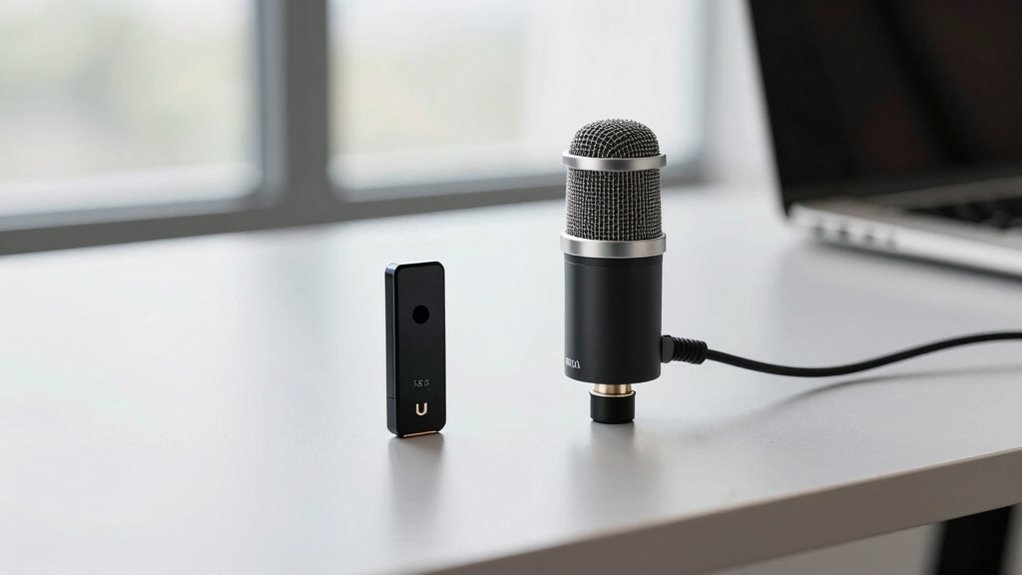
Choosing the right microphone can considerably enhance your minimalist office setup, especially when balancing simplicity with quality. When deciding between USB and XLR microphones, you need to consider how each aligns with your workspace priorities. USB microphones are popular for their plug-and-play convenience. You can connect them directly to your computer via a USB port, making setup quick and straightforward. This simplicity is ideal if you want to keep your desk clutter-free and avoid additional gear. Additionally, many USB mics now feature wireless connectivity options, allowing you to free up desk space even further, which is perfect for maintaining a clean, minimalist look. Wireless connectivity also provides flexibility in positioning, which can be a big advantage if your workspace layout changes frequently.
USB microphones offer quick, clutter-free setup with wireless options for flexible, minimalist workspace design.
On the other hand, XLR microphones are known for their superior sound quality when compared to most USB options. They typically deliver clearer, more professional audio with a broader dynamic range, making them suitable for serious content creators, podcasters, or remote workers who demand high fidelity. However, the need for an audio interface or mixer to connect an XLR mic can add to your setup’s complexity and potentially clutter your workspace. If you’re aiming for simplicity, this might seem like a downside, but if sound quality is your priority, investing in a good audio interface can be worthwhile. Keep in mind that XLR connections are less likely to experience issues like latency or interference, which can sometimes plague wireless or USB connections, especially in environments with lots of wireless signals or electronic devices. Additionally, professional audio equipment often provides more durability and longevity, which can be a significant advantage for long-term use. Moreover, investing in quality cables and connectors can further ensure consistent sound performance over time.
When comparing the sound quality, you’ll notice that XLR microphones generally outperform USB counterparts, especially at higher price points. They tend to produce richer, warmer tones with less background noise. Yet, high-end USB mics have closed the gap significantly, offering impressive sound quality that often satisfies most casual users. If your main concern is ease of use, portability, and minimal setup, a quality USB microphone might do the trick without sacrificing too much sound fidelity. Conversely, if you’re seeking the best possible audio for professional recordings or broadcasts, investing in an XLR setup is worth considering, despite the additional equipment.
For those who prioritize cost-efficiency, USB microphones often provide a more budget-friendly option without sacrificing too much quality, especially for casual or semi-professional use. Ultimately, your choice hinges on your priorities: simplicity and convenience versus professional-grade sound quality. Consider the kind of work you do, your space constraints, and how much you’re willing to invest in gear. Both USB and XLR microphones can fit into a minimalist office, but understanding their strengths and limitations helps you make an informed decision that aligns with your workflow and aesthetic. For example, selecting a compact microphone design can further enhance the minimalist appeal while maintaining performance. Being aware of the compatibility requirements for each type can help streamline your setup and ensure everything works harmoniously.
USB microphone for minimalist office
As an affiliate, we earn on qualifying purchases.
As an affiliate, we earn on qualifying purchases.
Frequently Asked Questions
Which Microphone Type Offers Better Durability for Daily Office Use?
You’ll find that XLR microphones generally offer better durability for daily office use, thanks to their superior build quality and microphone materials. They’re often made with rugged components designed to withstand frequent handling and long-term use. USB microphones, while convenient, tend to have lighter, less robust construction. If durability is your priority, investing in an XLR microphone provides a sturdier, more reliable option for your minimalist office environment.
Can I Upgrade My Microphone Without Replacing the Entire Setup?
Yes, you can upgrade your microphone without replacing your entire setup. Focus on microphone compatibility by checking if your audio interface options support new models. Upgrading to an XLR microphone, for instance, might require a different interface or an adapter. This way, you keep your current equipment intact while improving sound quality. Just make certain your audio interface can handle the new microphone’s specifications, making your setup smoothly scalable and versatile.
How Do USB and XLR Microphones Compare in Noise Cancellation?
USB microphones generally offer better built-in noise cancellation, reducing background noise directly at the source, which enhances sound quality. XLR microphones rely on external audio interfaces that can include noise reduction features, but they often require more setup. If your goal is to minimize background noise and improve sound quality with simplicity, a USB microphone might be the better choice for your minimalist office.
Are There Specific Brands That Excel in Minimalist Office Environments?
A good rule of thumb is “you get what you pay for,” especially in minimalist offices. Brands like Rode, Audio-Technica, and Shure excel in offering sleek, aesthetically pleasing microphones with strong reputations. These brands prioritize clean design and reliable performance, fitting seamlessly into minimalist environments. You’ll find options that blend into your workspace while delivering high-quality sound, making them ideal choices for maintaining a clutter-free, professional look.
What Are the Long-Term Cost Differences Between USB and XLR Microphones?
You’ll find that USB microphones usually have a lower initial price compared to XLR options. Over time, though, maintenance costs can differ; XLR mics might require additional equipment like audio interfaces, increasing expenses. USB microphones tend to have minimal maintenance, making them more cost-effective long-term for a minimalist office setup. Consider your budget for both the upfront investment and ongoing costs to choose the best option.
XLR professional studio microphone
As an affiliate, we earn on qualifying purchases.
As an affiliate, we earn on qualifying purchases.
Conclusion
Choosing between USB and XLR microphones is like picking the right paintbrush for your art—both can create stunning results, but it depends on your needs. USB mics are your quick, ready-to-go tools for simple setups, while XLR mics are the precision instruments for professional sound. In a minimalist office, your choice sets the tone—stick with what fits your workflow best and watch your communication shine like a well-crafted masterpiece.
wireless USB microphone for workspace
As an affiliate, we earn on qualifying purchases.
As an affiliate, we earn on qualifying purchases.
compact XLR microphone with audio interface
As an affiliate, we earn on qualifying purchases.
As an affiliate, we earn on qualifying purchases.
Halloween Picks
halloween
As an affiliate, we earn on qualifying purchases.